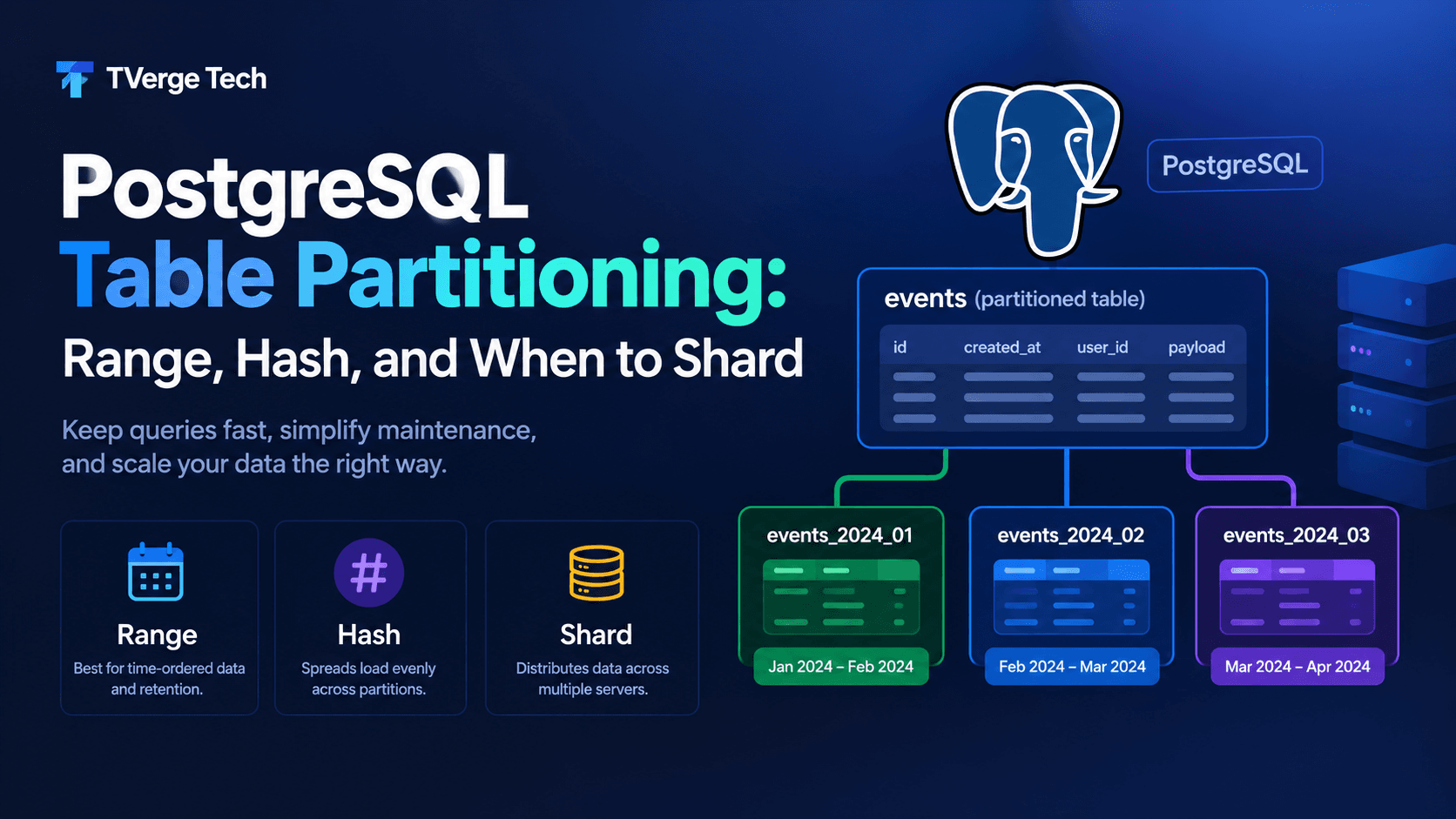
PostgreSQL Table Partitioning: Range, Hash, and When to Shard
A table with a few million rows is a convenience. A table with several billion rows is an operational commitment. Queries that used to return in milliseconds start scanning far more data than they need. Index maintenance slows every write. VACUUM runs for hours. Deleting last year's data turns into a multi-day job that bloats the table it was meant to shrink.
Declarative table partitioning is PostgreSQL's built-in answer to this problem. It splits one logical table into smaller physical tables while your application keeps querying a single name. Done well, it keeps queries fast, makes retention nearly instant, and shortens maintenance windows. Done badly, it adds planning overhead and operational complexity for no benefit.
This guide covers how to choose between range and hash partitioning, how to design the partition key, how to confirm the planner actually skips partitions, and how to automate the partition lifecycle. It also explains where partitioning stops and sharding begins. The examples use PostgreSQL 14 or newer, and the syntax is the same on current releases.
Key takeaways
Partitioning splits one table into smaller physical tables inside a single PostgreSQL server. Sharding spreads data across multiple servers. They solve different problems.
Use range partitioning for time-ordered data and retention. Use partitioning to spread load evenly when no natural range exists.
The partition key is the most important decision. Queries that don't filter on it scan every partition.
Primary keys and unique constraints on a partitioned table must include the partition key columns.
Always verify pruning with EXPLAIN. Don't assume it works.
Automate partition creation and retention. Manual partition management eventually causes an outage.
What partitioning is, and what it is not
Partitioning means splitting what is logically one large table into smaller physical pieces. In PostgreSQL's declarative model, you create a partitioned table, which is a virtual parent with no storage of its own. You then attach partitions, which are ordinary tables that each hold a slice of the data. The planner routes inserts to the correct partition and can skip partitions that cannot match a query.
It helps to separate three ideas that are often confused:
Partitioning divides one table into pieces on the same server. It improves query pruning, maintenance granularity, and data lifecycle management.
Sharding distributes data across multiple servers. It increases capacity beyond what one machine can hold or serve. PostgreSQL does not provide automatic sharding out of the box.
The PostgreSQL documentation notes that a rule of thumb is that a table is worth partitioning when its size exceeds the physical memory of the database server. Treat that as a starting point, not a trigger. The real question is whether your queries and maintenance tasks can exploit the split.
When partitioning is worth it (and when it isn't)
Partitioning pays off in these situations:
Time-series or append-heavy data. Events, logs, metrics, and audit trails are mostly written once and read by recent time ranges.
Retention policies. If you routinely delete data older than N months, dropping a partition is a metadata operation. A bulk DELETE rewrites pages, generates WAL, and leaves bloat behind.
Maintenance on huge tables. Smaller partitions mean smaller indexes and shorter VACUUM and REINDEX operations, and these can be done one partition at a time.
Hot and cold data. Recent partitions can live on fast storage while older ones move to cheaper tablespaces.
Predictable access by a single key. Per-tenant or per-account access can benefit from hash partitioning.
It is usually not worth it when:
The table is small enough to fit comfortably in memory and queries are already fast.
Most queries do not filter on any column you could use as a partition key. Every query would touch every partition, and you would pay overhead for nothing.
A missing index, stale statistics, or a poorly written query is the real cause of slowness. Fix those first. Partitioning does not rescue a bad query plan.
Partitioning also adds cost. Every extra partition adds planner work and memory use, and a schema change must propagate across all of them. More is not better. A few dozen or a few hundred well-chosen partitions are common. Many thousands deserve careful measurement.
Choosing the partition key
Pick the key before anything else, because changing it later means rebuilding the table.
A good partition key has these properties:
It appears in the WHERE clause of your most frequent and most expensive queries. This is what makes pruning possible.
It distributes rows in a way that matches your goal. For retention, that is time. For load spreading, that is a high-cardinality identifier.
It rarely changes. PostgreSQL can move a row between partitions when its key is updated, but that is a delete and an insert internally, so frequent key updates are expensive.
It can be part of your unique constraints. This one surprises many teams. A primary key or unique index on a partitioned table must include all partition key columns. A global unique index across all partitions on a column that is not the key is not possible.
That last constraint shapes your schema. If you partition events by created_at, your primary key becomes (event_id, created_at) rather than event_id alone. Application code that relies on event_id being globally unique must enforce it another way, for example by generating IDs from a single sequence or a UUID scheme. If you need test identifiers while experimenting, the Bulk UUID/GUID Generator is a quick way to produce sample values.
Range partitioning step by step
Range partitioning assigns each row to a partition based on which range its key falls into. Each range is inclusive at the lower bound and exclusive at the upper bound. This makes it the natural choice for time-series data.
Create the partitioned table
CREATE TABLE events (
    event_id    bigserial,
    tenant_id   integer      NOT NULL,
    event_type  text         NOT NULL,
    payload     jsonb        NOT NULL DEFAULT '{}',
    created_at  timestamptz  NOT NULL DEFAULT now(),
    PRIMARY KEY (event_id, created_at)
) PARTITION BY RANGE (created_at);
Notice that created_at is in the primary key. That is required, not optional.
Add an index on the parent
CREATE INDEX events_tenant_created_idx
    ON events (tenant_id, created_at DESC);
When you create an index on the partitioned parent, PostgreSQL creates a matching index on every existing partition and on any partition you add later. Each partition's index is small and local to that partition, which keeps index maintenance cheap.
Create the partitions
CREATE TABLE events_2026_10 PARTITION OF events
    FOR VALUES FROM ('2026-10-01 00:00:00+00') TO ('2026-11-01 00:00:00+00');

CREATE TABLE events_2026_11 PARTITION OF events
    FOR VALUES FROM ('2026-11-01 00:00:00+00') TO ('2026-12-01 00:00:00+00');
Spell out the time zone offset in the bounds. A bare date literal is interpreted in the session's TimeZone setting, so the same statement run from two different sessions could define different boundaries. Using an explicit offset, or running partition DDL with SET TIME ZONE 'UTC', removes that ambiguity.
Decide what to do with the default partition
A DEFAULT partition catches rows that fit no other range:
CREATE TABLE events_default PARTITION OF events DEFAULT;
It is a safety net against failed inserts when you forget to create next month's partition. It also has real costs:
If it ever accumulates rows, creating a new partition whose range overlaps those rows requires scanning the default partition, and it fails if any matching rows exist.
ALTER TABLE ... DETACH PARTITION ... CONCURRENTLY cannot be used on a table that has a default partition.
A common compromise is to keep the default partition and alert if it ever contains rows. Another is to omit it and treat a failed insert as a loud signal that automation broke. Choose deliberately and monitor either way.
Hash partitioning for even distribution
Hash partitioning applies a hash function to the key and assigns rows by the remainder of dividing that hash by a modulus. There is no natural ordering, so data spreads roughly evenly.
It is a good fit when you have no time dimension and want to avoid one giant table. Per-account activity logs and per-tenant data are typical examples.
CREATE TABLE account_activity (
    account_id   bigint       NOT NULL,
    activity_id  bigint       NOT NULL,
    action       text         NOT NULL,
    occurred_at  timestamptz  NOT NULL DEFAULT now(),
    PRIMARY KEY (account_id, activity_id)
) PARTITION BY HASH (account_id);

DO $$
BEGIN
  FOR r IN 0..7 LOOP
    EXECUTE format(
      'CREATE TABLE account_activity_p%s PARTITION OF account_activity
         FOR VALUES WITH (MODULUS 8, REMAINDER %s)', r, r);
  END LOOP;
END $$;
Hash partitioning has trade-offs you should understand before committing:
Pruning works only for equality. A query with WHERE account_id = 42 touches one partition. A query with WHERE account_id BETWEEN 1 AND 1000 touches all of them, because hash values scatter neighboring keys.
There is no cheap retention. You cannot drop "old" data by dropping a partition, because every partition contains a mix of old and new rows.
Skew is still possible. A single very large account hashes to one partition. Hashing evens out the number of distinct keys, not the volume behind each key.
Changing the partition count is a data migration. Plan the modulus for future growth. Choosing a power of two helps, as explained below.
Growing a hash-partitioned table
PostgreSQL lets partitions of the same table use different moduli, as long as each modulus is a factor of the next larger one. That allows a gradual split. To go from 4 partitions to 8, you detach the partition for remainder 0 of modulus 4, then create two new partitions, remainder 0 and remainder 4 of modulus 8, and copy the old rows into them. You can repeat this one partition at a time instead of rewriting the entire table at once.
Combining methods with sub-partitioning
A partition can itself be partitioned. A common pattern is range at the top level for retention, then hash inside each range to spread write load:
CREATE TABLE metrics (
    device_id    bigint       NOT NULL,
    recorded_at  timestamptz  NOT NULL,
    value        double precision,
    PRIMARY KEY (device_id, recorded_at)
) PARTITION BY RANGE (recorded_at);

CREATE TABLE metrics_2026_10 PARTITION OF metrics
    FOR VALUES FROM ('2026-10-01 00:00:00+00') TO ('2026-11-01 00:00:00+00')
    PARTITION BY HASH (device_id);

CREATE TABLE metrics_2026_10_h0 PARTITION OF metrics_2026_10
    FOR VALUES WITH (MODULUS 4, REMAINDER 0);
-- repeat for remainders 1, 2 and 3
Be careful with this approach. Four hash sub-partitions across twelve months is already 48 tables, and the count grows quickly. Use sub-partitioning only when a single range partition is still too large or too hot.
Prove that partition pruning works
Partition pruning is what delivers the performance benefit. When a query filters on the partition key, the planner skips partitions that cannot contain matching rows. Pruning is controlled by the enable_partition_pruning setting, which is on by default. Make sure nobody has turned it off.
Check it with EXPLAIN:
EXPLAIN (COSTS OFF)
SELECT count(*)
FROM events
WHERE created_at >= '2026-10-01 00:00:00+00'
  AND created_at <  '2026-10-08 00:00:00+00';
The plan should mention only events_2026_10. If it lists every partition, pruning is not happening.
Common reasons pruning fails
Wrapping the key in a function or cast. A filter such as WHERE date_trunc('day', created_at) = '2026-10-05' or WHERE created_at::date = '2026-10-05' hides the key from the planner. Rewrite it as a range on the raw column.
Filtering on a different column. A query filtered only on tenant_id cannot prune a table partitioned by created_at.
Mismatched types. Comparing a timestamptz key to a value of a different type can prevent the planner from using the bounds.
Hash partitioning with range predicates. As noted above, only equality helps.
PostgreSQL can also prune at execution time, not only during planning. This matters for prepared statements and parameterized queries, where the value is not known until the query runs. In those plans you will see the partitions listed but marked as pruned or never executed. Look at EXPLAIN (ANALYZE) output to see that distinction.
Make pruning part of code review. Any new query against a partitioned table should come with an EXPLAIN showing that it prunes.
Automate the partition lifecycle
The fastest way to turn partitioning into an incident is to manage partitions by hand. Someone forgets to create December's partition, inserts start failing or flooding the default partition, and the on-call engineer finds out at midnight.
Pre-create future partitions
A small function can create partitions ahead of time. This version is idempotent, so it is safe to run repeatedly:
CREATE OR REPLACE FUNCTION ensure_event_partitions(months_ahead int DEFAULT 3)
RETURNS void
LANGUAGE plpgsql
AS $$
DECLARE
  start_ts  timestamp;
  end_ts    timestamp;
  part_name text;
BEGIN
  FOR i IN 0..months_ahead LOOP
    start_ts  := date_trunc('month', now() AT TIME ZONE 'UTC')
                 + make_interval(months => i);
    end_ts    := start_ts + interval '1 month';
    part_name := format('events_%s', to_char(start_ts, 'YYYY_MM'));

    EXECUTE format(
      'CREATE TABLE IF NOT EXISTS %I PARTITION OF events
         FOR VALUES FROM (%L) TO (%L)',
      part_name,
      (start_ts AT TIME ZONE 'UTC')::text,
      (end_ts   AT TIME ZONE 'UTC')::text
    );
  END LOOP;
END $$;
Run it on a schedule. Options include a scheduler extension such as pg_cron, a Kubernetes CronJob, or a cloud scheduler. If you schedule with AWS EventBridge, the AWS Cron Visualizer helps you confirm what a six-field expression will actually do before you deploy it.
Also alert on the failure case. A monitoring query that checks whether a partition exists for the next month, or whether the default partition has rows, catches problems before users do.
Retire old data safely
Dropping old data is where range partitioning shines:
ALTER TABLE events DETACH PARTITION events_2025_10 CONCURRENTLY;
-- archive it, export it, or drop it
DROP TABLE events_2025_10;
The CONCURRENTLY option detaches with a weaker lock so it does not block concurrent queries on the parent for long. It cannot run inside a transaction block and is not available when a default partition exists, as noted earlier. Detaching first, rather than dropping directly, gives you a window to archive the data to cheaper storage before removal.
Load data without long locks
When you need to bulk load a month of data, build it in a standalone table, validate it, then attach it:
CREATE TABLE events_2026_12 (LIKE events INCLUDING ALL);

-- bulk load into events_2026_12 here

ALTER TABLE events_2026_12
  ADD CONSTRAINT events_2026_12_bounds
  CHECK (created_at >= '2026-12-01 00:00:00+00'
     AND created_at <  '2027-01-01 00:00:00+00');

ALTER TABLE events ATTACH PARTITION events_2026_12
  FOR VALUES FROM ('2026-12-01 00:00:00+00') TO ('2027-01-01 00:00:00+00');
The CHECK constraint lets PostgreSQL skip the full-table scan it would otherwise perform to verify that every row belongs in the range. Once attached, the redundant constraint can be dropped. Creating the table with INCLUDING ALL also gives it matching indexes up front, so attaching does not have to build them.
Indexes and constraints on partitioned tables
A few rules matter in practice:
Indexes are local. Each partition has its own index. This keeps them small, but it also means there is no single global index spanning all partitions.
Unique indexes must include the partition key. This is the constraint discussed earlier, and it is enforced everywhere.
CREATE INDEX CONCURRENTLY is not supported directly on a partitioned parent. The documented workaround is to create the index on the parent with the ONLY keyword, which creates an invalid placeholder. Then build an index concurrently on each partition and attach each one to the parent index. The parent index becomes valid once every partition's index is attached.
BRIN can be a strong fit for time-ordered partitions. When rows arrive roughly in time order, a BRIN index on the timestamp column is tiny compared with a B-tree. See our indexing guide for when that works and when it doesn't.
Foreign keys. PostgreSQL supports foreign keys that reference partitioned tables, and foreign keys on partitioned tables themselves. Because the referenced key must include the partition key, check that your relationships still make sense in the new design.
Routine maintenance on a partitioned table
Partitioning changes how you think about vacuum and statistics:
Autovacuum works on partitions, not on the parent. Each partition is vacuumed and analyzed independently, which is a benefit: a huge table no longer forces one enormous vacuum run.
The partitioned parent is not analyzed automatically. Planner statistics for the parent do not update on their own, so schedule ANALYZE events; periodically. Queries that don't prune can depend on those statistics.
Tune per partition. A hot, current partition may need more aggressive autovacuum settings than a cold historical one. Storage parameters can be set on individual partitions.
Cold partitions can be set aside. Once a partition stops receiving writes, you can freeze it, compact it, or move it to a cheaper tablespace without touching current data.
If your workload involves long-running transactions or heavy row locking, partitioning will not remove those problems. Our article on isolation levels and SELECT ... FOR UPDATE explains how to avoid deadlocks regardless of table layout.
Migrating an existing large table
Converting a live table to a partitioned one is the hardest part, because PostgreSQL cannot convert a regular table in place. Two approaches work in practice.
Approach A: new table, backfill, swap.
Create the new partitioned table with the final design, including the partition key in the primary key.
Start writing new rows to both tables, using application-level dual writes or a trigger on the old table.
Copy historical data in batches, oldest first, in small transactions so you do not hold locks or bloat WAL.
Verify row counts and checksums on a sample.
In a short maintenance window, switch the application to the new table, then rename or retire the old one.
Approach B: attach the old table as a partition.
Add a CHECK constraint to the existing table that matches the range it covers. Adding it as NOT VALID and then validating it avoids a long exclusive lock.
Create the partitioned parent, then use ATTACH PARTITION to attach the old table as the first partition, with an open lower bound such as MINVALUE.
Create new partitions for ongoing data.
This is often the lowest-downtime path, but it has a catch. If the parent requires an index that the old table lacks, attaching builds it, and that scans the whole table. Create matching indexes on the old table concurrently before the attach.
Whichever path you choose, rehearse it on a recent copy of production data and measure how long each step takes. Never discover your lock durations on the live system.
Common mistakes to avoid
Partitioning on a column your queries never filter by. You pay the overhead and get no pruning.
Creating too many tiny partitions. Daily partitions on a table that gets a few thousand rows a day just add planning cost. Match partition size to data volume.
Forgetting the unique-key rule until migration day. Check your primary key and foreign key design early.
Relying on a default partition silently. A growing default partition is a sign that your automation is broken.
Skipping EXPLAIN checks. Pruning that works in testing can break after a harmless-looking query rewrite.
Ignoring time zones in range bounds. Partition boundaries should be unambiguous.
Treating partitioning as sharding. It doesn't add servers. If the single machine is the bottleneck, partitioning will not fix that.
From partitioning to sharding
Partitioning keeps all your data on one PostgreSQL server. At some scale, one server cannot hold the data, absorb the writes, or serve the reads, no matter how well it is partitioned. That is where sharding enters.
Sharding distributes data across multiple independent servers, called shards, using a shard key. PostgreSQL does not provide automatic sharding as a built-in feature. You have three realistic paths:
Foreign-table partitions with postgres_fdw. A partition of a partitioned table can be a foreign table that lives on another server, so one partitioned table can span machines.
A distributed PostgreSQL extension. The Citus extension distributes tables across worker nodes and handles query routing. Consult the official Citus documentation for its current requirements and limits.
Application-level sharding. Your application or a routing layer decides which database holds each tenant or key.
Here is the foreign-table pattern in outline, with a hash-partitioned parent where one remainder lives on another server:
CREATE EXTENSION postgres_fdw;

CREATE SERVER shard_b
  FOREIGN DATA WRAPPER postgres_fdw
  OPTIONS (host 'shard-b.internal', dbname 'app', port '5432');

CREATE USER MAPPING FOR app_user
  SERVER shard_b
  OPTIONS (user 'app_user', password '<store-and-rotate-securely>');

CREATE FOREIGN TABLE orders_shard_b
  PARTITION OF orders
  FOR VALUES WITH (MODULUS 2, REMAINDER 1)
  SERVER shard_b
  OPTIONS (table_name 'orders_local');
Read the limits before relying on this. Foreign partitions have restrictions: you cannot create a unique index on a partitioned table that includes foreign partitions, some row-movement operations across local and foreign partitions are restricted, and cross-server joins and aggregations may pull data over the network instead of running remotely. Transactions that touch multiple servers do not get the same guarantees as single-server transactions, so design for that.
Choosing a shard key
The same rules as the partition key apply, with higher stakes. A shard key should have high cardinality, appear in nearly every query, and keep related rows together so most queries touch one shard. Tenant ID is a common choice for multi-tenant systems, because a tenant's data stays on one shard and cross-shard queries are rare. Re-sharding later is expensive, so test your key against real query patterns first.
A sensible decision ladder
Move up one step only when the step below is exhausted:
Fix queries and add the right indexes.
Tune autovacuum, memory, and connection pooling.
Add read replicas for read-heavy workloads.
Partition large tables on the same server.
Archive or tier cold data.
Shard across servers.
Each step up adds operational complexity. Most teams never need the last one.
Production checklist
Before you roll partitioning out, confirm each of these:
The partition key appears in the filters of your top queries, and EXPLAIN shows pruning.
Primary keys and unique constraints include the partition key.
Partition creation is automated, idempotent, and monitored.
Retention is automated and uses detach before drop.
Bounds use explicit time zones.
You decided deliberately whether to keep a default partition, and you alert when it holds rows.
ANALYZE runs on the parent on a schedule.
You have tested the migration on production-sized data and measured lock times.
Is partitioning the same as sharding?
No. Partitioning splits a table into pieces on one server. Sharding spreads data across multiple servers. You can combine them, with each shard partitioning its own tables.
Should I choose range or hash partitioning?
Choose range when your data is time-ordered or you need cheap retention. Choose hash when you want even distribution and your queries filter by equality on the key.
Will partitioning always make queries faster?
No. It helps queries that filter on the partition key. Queries that do not can become slightly slower because the planner must consider every partition.
How many partitions are too many?
There is no universal number. Planning time and memory use grow with partition count. Hundreds are common in production. If you are heading into the thousands, measure planning time and consider fewer, larger partitions.
Can I make a unique constraint on a column that isn't the partition key?
Not as a global constraint. Unique indexes on a partitioned table must include all partition key columns. Enforce wider uniqueness through ID generation or application design.
Can I convert an existing table to a partitioned table in place?
No. You build a new partitioned table and move data into it, or attach the existing table as a partition. Both approaches are described above.
Do I need an extension to partition?
No. Declarative partitioning is built into PostgreSQL. Extensions can help automate partition management, but the core feature does not require one.
Conclusion
Partitioning works when the design matches the access pattern. Choose a key your queries actually filter on, use range partitioning for time-based data and retention, use hash partitioning for even distribution, and verify pruning with EXPLAIN instead of trusting it. Automate the lifecycle so partitions are created before they are needed and removed when they are not. Treat sharding as a later step, once a single well-tuned, well-partitioned server genuinely cannot keep up.
Start small. Pick one large, append-heavy table, rehearse the migration on a copy, and measure the change in query plans and maintenance time before expanding the pattern.
Test every statement on a non-production copy before using it. Behavior can vary by PostgreSQL version, so confirm details against the documentation for the version you run.