Configuring GitHub Actions for Lightning-Fast CI/CD Parallel Test Pipelines
A slow pipeline taxes every pull request. Developers context-switch while they wait, reviews stall, and "just rerun it" becomes a habit that hides real failures. The good news is that most slow pipelines are slow for fixable reasons: tests run one after another on a single runner, dependencies are downloaded from scratch on every run, and superseded commits keep burning minutes nobody needs.
This guide shows you how to configure GitHub Actions to run tests in parallel, and how to do it without trading speed for flaky builds, confusing reports, or a surprise bill. You'll get working workflow files for Jest, Vitest, and Playwright, plus the supporting pieces that make a parallel pipeline trustworthy: caching, concurrency control, a single required status check, and a safe hand-off to deployment.
Last updated: October 14, 2026. Action versions shown are current as of writing; always check each action's releases page before copying.
Key takeaways
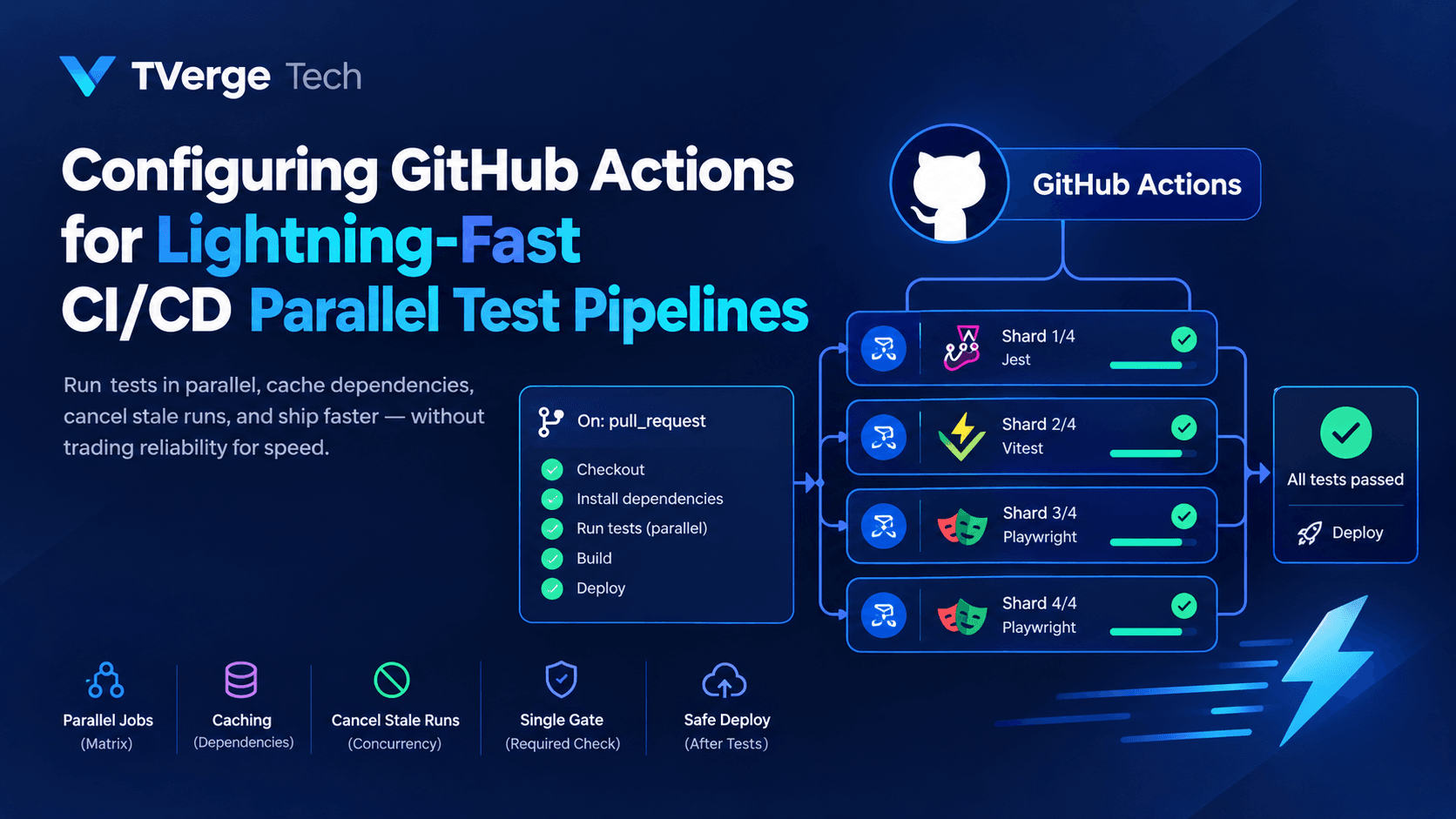
Parallelism comes from jobs, not steps. Steps inside a job run sequentially. To run work at the same time, you need separate jobs, usually created with a matrix strategy.
Shard your tests across a matrix. Jest, Vitest, and Playwright all support a --shard=<index>/<total> flag that splits a suite across runners.
Every shard pays a fixed setup cost, so total billed time grows as you add runners.
Cache dependencies and cancel stale runs. These two changes often save more time than sharding itself.
Use one "gate" job as your required check. It keeps branch protection simple even when the matrix changes size.
Why pipeline speed matters beyond the clock
Pipeline duration is a feedback-loop problem. When checks take 25 minutes, people batch changes into bigger pull requests, which are harder to review and riskier to merge. When checks take 5 minutes, small, frequent changes become the path of least resistance.
Speed also affects trust. A pipeline that's slow and occasionally red for no reason teaches the team to ignore it. That's why this guide pairs every speed technique with a reliability technique.
A word on honesty: no configuration can promise a specific speedup. Your gains depend on how test time is distributed, how heavy your setup is, and what your runners can handle. Measure first, then tune.
How parallelism works in GitHub Actions
Before changing any YAML, it helps to be precise about what runs in parallel and what doesn't.
Steps within a single job run one after another on the same runner.
Jobs in a workflow run in parallel by default, unless you add dependencies with needs.
A matrix strategy takes one job definition and expands it into several jobs, each with different input values.
A matrix is the workhorse of parallel testing. You define one test job, list the shard numbers, and GitHub Actions creates a separate job (and a separate runner) for each combination. The official matrix strategy documentation covers the full syntax, including include, exclude, fail-fast, and max-parallel.
Two limits are worth knowing up front. According to GitHub's Actions limits reference, a job matrix can generate a maximum of 256 jobs per workflow run, and the number of jobs that can run at the same time on GitHub-hosted runners varies by plan. If you queue more jobs than your plan allows to run concurrently, the extra jobs wait, which can quietly cancel out your parallelism gains.
Step 1: Measure your baseline
You can't improve what you haven't measured. Open the Actions tab, pick a recent successful run on your main branch, and write down four numbers:
Total wall-clock time from trigger to final green check.
Setup time: checkout, runtime install, dependency install, and browser install if you use one.
Test execution time: the part sharding can actually divide.
Queue time: how long jobs waited for a runner.
Setup time matters most here. If setup takes 2 minutes and tests take 10, splitting tests across four runners gives you roughly 2 + 2.5 = 4.5 minutes, not 2.5. Setup is a fixed cost every shard pays.
Here's an illustrative calculation, using assumed numbers (not benchmarks) of 20 minutes of test work and 1.5 minutes of per-runner setup, assuming perfectly even shards:
Shards
Wall-clock time
Total runner minutes
1
21.5 min
21.5 min
2
11.5 min
23.0 min
4
6.5 min
26.0 min
8
4.0 min
32.0 min
16
2.75 min
44.0 min
The pattern is the point: wall-clock time drops quickly at first, then flattens, while total runner minutes keep climbing. For most teams, the sweet spot is a handful of shards, not dozens. Also remember that GitHub bills per job, and partial minutes round up, so very short shards can cost more than the arithmetic suggests. Check the current billing documentation for your plan before scaling out.
Step 2: Start with a clean, cached baseline
Parallelism multiplies setup cost, so fix setup first. Here's a minimal single-job workflow that already includes the habits you'll keep:
name: CI

on:
  pull_request:
  push:
    branches: [main]

permissions:
  contents: read

jobs:
  test:
    runs-on: ubuntu-latest
    timeout-minutes: 15
    steps:
      - uses: actions/checkout@v6

      - uses: actions/setup-node@v6
        with:
          node-version: 22
          cache: npm

      - run: npm ci
      - run: npm test
Three details are doing real work:
permissions: contents: read limits what the automatic GITHUB_TOKEN can do. Start restrictive and add only what a job needs.
timeout-minutes stops a hung test from consuming runner time for hours. Set it a little above your normal worst case.
cache: npm tells setup-node to restore and save the npm cache for you. GitHub's dependency caching reference notes that the setup-* actions for common package managers (including Node, Python, and Java tooling) create and restore dependency caches with minimal configuration, so you often don't need to write cache keys by hand.
Use npm ci rather than npm install in CI. It installs exactly what the lockfile specifies, fails if the lockfile and package.json disagree, and is generally the right choice for reproducible builds.
Step 3: Parallelize with a test-sharding matrix
Sharding splits your test files into N roughly equal groups. Each matrix job runs one group. All three major JavaScript runners support the same flag shape: --shard=<index>/<total>.
Vitest
Vitest documents sharding in its performance guide. The simplest form needs no special reporter:
Notice that shardTotal is its own matrix key with a single value. That keeps the total in one place: change it once and the --shard flag stays consistent. You'll still list the indexes manually, so keep the two in sync (or generate them dynamically, as shown later).
If you want one combined report or merged coverage, Vitest supports a blob reporter. Per the Vitest docs, you run each shard with --reporter=blob, collect the files from the .vitest-reports directory, and then run vitest --merge-reports in a final job. Because that directory starts with a dot, add include-hidden-files: true to your upload step, since recent versions of actions/upload-artifact skip hidden files by default.
Jest
Jest ships a built-in --shard option (available in current major versions; see the Jest CLI reference):
- run: npx jest --ci --shard=${{ matrix.shardIndex }}/${{ matrix.shardTotal }}
The --ci flag makes Jest fail instead of silently writing new snapshots, which is exactly what you want on a build server.
Playwright
End-to-end tests are usually the slowest part of a pipeline, so they benefit most. Playwright's sharding guide recommends the blob reporter on CI, so each shard produces a mergeable report. In playwright.config.ts:
forbidOnly makes the build fail if someone commits a stray test.only, which would otherwise turn a full run into a one-test run that passes. The workflow job:
Two things to notice. First, each artifact name includes the shard index. With the current artifact actions, names must be unique within a run, so identical names from parallel jobs will collide. Second, the upload step uses !cancelled() so reports are saved even when tests fail, which is when you need them most.
Step 4: Merge reports and add a single gate job
Sharded runs create two reporting problems: partial reports, and a required-check headache.
Merge the shard reports
Add a job that waits for all shards, downloads every blob, and produces one report:
The needs: e2e line guarantees ordering, and if: ${{ !cancelled() }} makes the merge job run even when some shards fail, so you still get a combined report of the failures. Both patterns mirror Playwright's own documented GitHub Actions example. Using a distinct pw- prefix for the artifact pattern also prevents this job from accidentally downloading unit-test blobs if you add those later.
Add one gate job for branch protection
If you mark individual matrix jobs as required checks, you'll need to update repository settings every time you change the shard count, because each matrix job has its own name. Instead, add one job that summarizes everything and require only that:
  ci-gate:
    name: CI gate
    if: ${{ always() }}
    needs: [lint-and-typecheck, unit-tests, e2e]
    runs-on: ubuntu-latest
    steps:
      - name: Fail if any required job failed or was cancelled
        run: |
          if [[ "${{ contains(needs.*.result, 'failure') }}" == "true" || \
                "${{ contains(needs.*.result, 'cancelled') }}" == "true" ]]; then
            echo "One or more required jobs did not succeed."
            exit 1
          fi
The if: always() matters. Without it, a failed upstream job would cause the gate to be skipped, and a skipped required check can be treated as passing or as pending depending on your settings. Making the gate run and fail explicitly removes the ambiguity.
One related caution: if a workflow is skipped entirely by path filters, a required check from that workflow may never report and can leave pull requests waiting. Keep the gate in a workflow that always triggers, and do your path-based filtering inside jobs instead.
Step 5: Caching that actually pays off
Caching is the other half of speed. Done well, it removes minutes from every shard; done badly, it adds restore time and stale surprises.
Dependency caches
For package managers covered by the setup-* actions, the built-in cache input is usually enough. For anything else, use actions/cache with a key derived from a lockfile hash. The documentation describes the key and restore-keys mechanics in detail:
When the exact key misses, the cache action tries each restore-keys entry in order, which lets a new lockfile start from the previous, mostly-correct cache instead of from nothing.
Know the limits
Per GitHub's limits reference, each repository gets 10 GB of cache storage by default, and older entries are evicted as you approach that limit. There are also per-minute rate limits on cache uploads and downloads per repository. With a large matrix, hundreds of jobs hitting the cache at once is the kind of thing that can bump into them. Keep cache contents lean, and avoid having every shard save the same cache. Restoring in all shards and saving from a single job is a common pattern.
Be skeptical about caching browsers
It's tempting to cache Playwright browser binaries. Measure it first: if restoring a multi-hundred-megabyte cache takes about as long as downloading the browsers, you've added complexity for no gain. npx playwright install --with-deps is simple and predictable, which counts for a lot.
Mind cache scope
Caches follow branch-scoping rules: a pull request can generally restore caches from its own branch, its base branch, and the default branch, but not from sibling branches. In practice, that means your main branch should run CI often enough to keep a warm cache that every pull request can fall back on.
Step 6: Stop paying for stale runs with concurrency
Every push to a pull request branch starts a new run, and the older runs for the same branch are usually now pointless. The concurrency key fixes that. GitHub's concurrency documentation explains that by default, multiple workflow runs can execute at the same time, and that cancel-in-progress cancels the older run in the same group.
This cancels superseded runs on pull request branches but lets every commit on main finish, so you keep a complete history of results where it matters. The docs confirm that cancel-in-progress can be an expression, which is what makes this conditional version possible.
Two cautions:
Group names must be unique across workflows. If two workflows share a group name, one can cancel the other. Including github.workflow in the group prevents that.
Never auto-cancel deployments. A half-finished deploy is worse than a slow one. Use a separate concurrency group with cancel-in-progress: false for deploy jobs (shown below).
Step 7: Tune fail-fast, max-parallel, and timeouts
Three matrix settings control how your parallel jobs behave when things go wrong.
fail-fast defaults to true for matrices, meaning that when one job fails, in-progress and queued matrix jobs are cancelled. That saves minutes but hides information: you see the first failure, not all of them. For test shards, fail-fast: false is usually better, because you want the complete list of failing tests in a single run rather than a fix-and-rerun cycle. Keep fail-fast: true where one failure genuinely makes the rest meaningless, such as a build matrix.
max-parallel caps how many matrix jobs run at once. Use it when you're sharing limited runner capacity with other workflows, or when jobs hit a shared external resource, such as a staging API with rate limits. Otherwise, leave it unset.
timeout-minutes belongs on every job. The default job timeout is generous, and a deadlocked test can eat a lot of it.
Step 8: Generate the matrix dynamically
Hard-coded shard lists work, but they invite mistakes: someone changes shardTotal and forgets the indexes. A small planning job can generate the matrix, and fromJSON feeds it to the test job. GitHub's matrix documentation shows that matrix values can come from expressions and contexts, not just literals.
range(1;5) produces [1,2,3,4]. If a dynamic matrix ever fails with a confusing error, the culprit is almost always malformed JSON in the output. Paste the value into a JSON formatter and validator to see exactly where it breaks, or read our walkthrough on debugging JSON parse errors.
The same technique scales to monorepos: a planning job detects which packages changed and emits a matrix containing only those, so unrelated pull requests skip unrelated tests.
Keeping shards balanced
Sharding splits work by test file by default, not by test duration. If one file contains a third of your suite, the shard that gets it will finish last no matter how many shards you add. Wall-clock time is set by your slowest shard.
Practical ways to even things out:
Split giant test files. Smaller files distribute better.
Enable fully parallel mode where appropriate. Playwright can distribute individual tests rather than whole files when fullyParallel is enabled, which gives finer-grained balancing, provided your tests are independent.
Look at per-shard durations. The job durations in the Actions UI show you immediately when one shard lags.
Adjust the shard count only after fixing imbalance. Adding shards to compensate for one slow file wastes minutes.
Isolation: the thing that makes or breaks parallel tests
Parallel tests fail in a particular way: they pass alone and fail together. The usual causes are shared state.
Here is some good news that's easy to overlook. Each matrix job runs on its own runner, with its own filesystem, ports, and any service containers you define for that job. Sharding across jobs gives you isolation for free, as long as shards don't share an external resource such as a staging database or a third-party sandbox account.
If they do, namespace everything by shard index: a schema per shard (test_${{ matrix.shardIndex }}), unique email addresses, unique storage prefixes. Within a single database, also be aware that concurrent transactions can deadlock or read data you didn't expect. Our guide on isolation levels and SELECT FOR UPDATE explains the mechanics behind those failures.
Finally, treat retries as a diagnostic tool, not a fix. A test that passes only on retry is flaky; track those tests and repair them. Playwright reports tests that passed after a retry separately, which makes this practical.
From green CI to safe CD
Fast tests are only valuable if they gate something. Wire deployment to the gate job so a deploy can't start unless the whole matrix passed:
  deploy:
    needs: ci-gate
    if: github.ref == 'refs/heads/main'
    runs-on: ubuntu-latest
    environment: production
    concurrency:
      group: deploy-production
      cancel-in-progress: false
    permissions:
      contents: read
      id-token: write
    steps:
      - uses: actions/checkout@v6
      # ...build and deploy steps for your platform...
Why each part is there:
needs: ci-gate makes the deploy depend on one clear signal instead of a list of jobs.
environment: production lets you add protection rules, such as required reviewers, in repository settings.
A dedicated concurrency group with cancel-in-progress: false queues deploys instead of killing one halfway.
id-token: write only if you use OpenID Connect to get short-lived cloud credentials instead of storing long-lived secrets. Grant it on the deploy job alone.
Parallel matrices are also the standard way to build for several platforms at once. If you publish native modules, our guide to Node-API native addons in C++ and Rust covers the packaging side that a build matrix would automate.
Security and cost hygiene
Speed work tends to add jobs, secrets, and third-party actions, so tighten the basics at the same time:
Least-privilege permissions. Set permissions at the workflow level and widen it per job only when needed.
Pin third-party actions. For actions outside GitHub's own, pinning to a full commit SHA protects you from a tag being moved. Review GitHub's security hardening guidance in the Actions documentation.
Be careful with pull requests from forks. Secrets aren't passed to fork-triggered pull_request runs by default, for good reason. Avoid pull_request_target with untrusted code unless you fully understand the implications.
Set artifact retention deliberately. Shard blobs are only useful until the merge job finishes, so retention-days: 1 keeps you well under storage quotas. The limits page lists artifact storage by plan.
Watch the monthly minute budget. Parallelism raises total runner minutes even as it lowers wall-clock time. If you're on a plan with included minutes, check your usage after rolling out a larger matrix.
The complete workflow
Here's everything combined into one file you can adapt. Adjust the Node version, scripts, and shard counts to your project.
Add this workflow's CI gate as the only required status check in branch protection, and your matrix can change freely without touching repository settings.
Common mistakes to avoid
Mistake
Why it hurts
Fix
Sharding before fixing setup time
Every shard repeats slow installs
Cache dependencies first
Same artifact name in every shard
Uploads collide and fail
Include the shard index in the name
Requiring individual matrix jobs
Settings break when shard count changes
Require one gate job
fail-fast: true on test shards
You see only the first failure
Set fail-fast: false
No timeout-minutes
A hung test burns runner time
Set a realistic timeout per job
Cancelling in-progress deploys
Can leave a release half-applied
Separate group, cancel-in-progress: false
Adding shards to hide one slow file
Wall-clock time doesn't improve
Split the file or enable fully parallel mode
Shards sharing an external database
Cross-test interference
Namespace data per shard
Frequently asked questions
How do I run tests in parallel in GitHub Actions?
Create a matrix strategy on your test job so GitHub Actions expands it into several jobs that run at the same time, then split your suite across them with a sharding flag such as --shard=1/4. Jest, Vitest, and Playwright all support this flag.
How many parallel jobs can I run?
It depends on your plan and runner type. GitHub documents job-concurrency limits for GitHub-hosted runners, and a single matrix can create at most 256 jobs per workflow run. Jobs beyond your concurrency limit queue until a runner frees up. See the Actions limits reference for current numbers.
Does parallel testing cost more?
Wall-clock time falls, but total runner minutes usually rise because each shard repeats setup work. Measure your setup time, keep the shard count modest, and review your usage after changes.
How do I get one report from many shards?
Use a blob (mergeable) reporter in each shard, upload each shard's output as a uniquely named artifact, and add a final job that downloads them all and merges them. Playwright and Vitest both document this flow.
What is the difference between fail-fast and max-parallel?
fail-fast controls whether remaining matrix jobs are cancelled when one fails. max-parallel limits how many matrix jobs run simultaneously. They solve different problems and can be used together.
Why do my tests pass locally but fail when sharded?
Almost always shared state or hidden ordering dependencies: tests that rely on data created by other tests, fixed ports, or a shared database. Make tests independent and namespace shared resources by shard.
Should I use a third-party tool to balance shards?
Built-in sharding is a good starting point. If one slow file dominates, splitting it often helps more than adding tooling. Consider duration-aware balancing only after you've confirmed that imbalance, not setup time, is your bottleneck.
Conclusion
A fast GitHub Actions pipeline is built from a small set of dependable habits: measure first, cache setup, shard tests across a matrix, merge the results into one report, cancel stale runs, and protect your branch with a single gate check. Each piece is simple on its own. Together they shrink feedback time without making the pipeline harder to trust.
Start small. Cache dependencies, add concurrency, and shard your slowest suite across three or four jobs. Look at the per-shard timings, fix any imbalance, and only then consider scaling further. When wall-clock time stops improving and runner minutes keep rising, you've found your sweet spot.
3React 19 Signals vs Context API: Global State Guide