We use cookies for analytics and advertising. Ads are disabled until you accept advertising cookies. Read our Cookie Policy and Privacy Policy.
Fix Out-of-Order Network Responses in Search UIs | TVerge Tech
Fix Out-of-Order Network Responses in Search UIs
Learn why search boxes show stale results and how to fix out-of-order network responses with AbortController, request IDs, React hooks and TanStack Query.
Handling Out-of-Order Network Responses in Search Interfaces
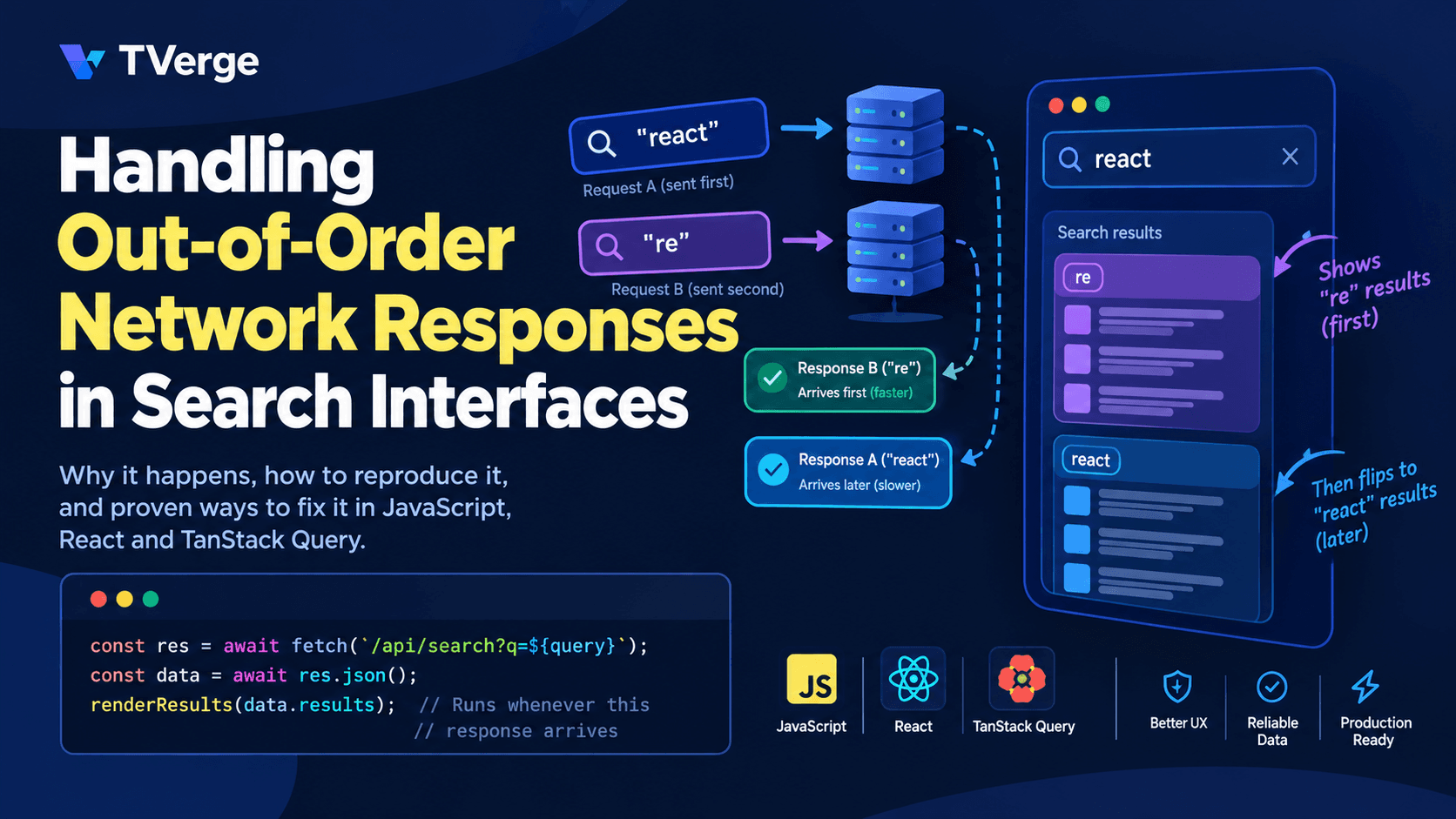
You type "react" into a search box. Results for "react" appear for a split second, then the list flips to results for "re". Nothing is wrong with your backend and your query was correct. You just met one of the most common bugs in interactive web applications: out-of-order network responses.
This guide explains why responses arrive in a different order than requests were sent, how to reproduce the problem reliably, and how to fix it with patterns that work in plain JavaScript, React, and TanStack Query. It also covers server-side details, accessibility, and testing, which most tutorials skip.
Why Network Responses Arrive Out of Order
HTTP gives you no guarantee that responses return in the order requests were sent. Even if your client sends request A before request B, B can finish first for many ordinary reasons:
Different workloads. A short query like "re" may match thousands of records and take longer than a specific query like "react hooks", which matches a handful.
Multiple server instances. Requests can be routed to different instances or regions with different load, cache state, or cold-start behavior.
Connection behavior. With HTTP/2 or HTTP/3, requests share a connection but are processed independently. With HTTP/1.1, browsers open several connections per host, so requests can complete in any order.
Cache hits. A cached response for one query can return almost instantly while an earlier uncached request is still in flight.
Retries and packet loss. On mobile networks, a request can stall and recover well after later requests have succeeded.
On a fast office connection you may never see the bug. On a slow phone connection or a busy backend it can happen often, which is why it tends to slip through local testing and appear in production.
The Anatomy of the Bug
Here is the classic "search as you type" implementation that contains the bug:
Now follow a timeline as the user types "re" and then "react":
Time (ms)
Event
0
User types "re", request A is sent
120
User types "react", request B is sent
300
Response B arrives, UI shows results for "react"
650
Response A arrives, UI shows results for "re"
The UI now says "react" in the input but displays results for "re". Each handler did exactly what it was written to do. The flaw is that the last response to arrive wins, instead of the response to the latest request.
This is a race condition in the classic sense: the outcome depends on timing the application doesn't control. The fix is to make the application decide which response is allowed to update the screen.
Strategy 1: Cancel Obsolete Requests with AbortController
The modern, standard way to stop outdated requests is the AbortController API. You create a controller for each request, pass its signal to fetch, and call abort() when a newer request supersedes it.
let controller = null;

async function search(query) {
  // Cancel the previous in-flight request, if any
  controller?.abort();
  controller = new AbortController();
  const { signal } = controller;

  showLoading();

  try {
    const res = await fetch(`/api/search?q=${encodeURIComponent(query)}`, { signal });
    if (!res.ok) throw new Error(`Request failed with status ${res.status}`);

    const data = await res.json();

    // Defensive check: abort may have happened while parsing
    if (signal.aborted) return;

    renderResults(data.results);
  } catch (error) {
    // An aborted request is expected behavior, not an error
    if (error.name === 'AbortError') return;
    showError(error);
  }
}

input.addEventListener('input', (event) => search(event.target.value));
A few details matter here:
Aborting rejects the promise. When you call abort(), the pending fetch rejects with an AbortError by default. Treat that as normal control flow. Never show it to the user.
Abort also affects body reading. If you abort while res.json() is still reading the body, that promise rejects too. The signal.aborted check is an extra safety net.
Custom abort reasons change the error. If you call controller.abort(someReason), the rejection uses that reason instead of an AbortError. In that case, check signal.aborted rather than the error name.
Search requests should also have a time limit so a stalled request doesn't leave the UI loading forever. AbortSignal.timeout() creates a signal that aborts after a set duration, and AbortSignal.any() combines several signals into one:
const signal = AbortSignal.any([
  controller.signal,        // cancelled by a newer search
  AbortSignal.timeout(8000) // cancelled after 8 seconds
]);

const res = await fetch(url, { signal });
Check current browser support on MDN before relying on either method in production. If you must support older browsers, a setTimeout that calls controller.abort() achieves the same result.
Strategy 2: Ignore Stale Responses with a Request Token
Cancellation is the best first line of defense, but it isn't always enough. Some libraries and wrappers don't accept an abort signal. Some requests have already completed on the network by the time you decide they're obsolete. In those cases, add a "latest wins" guard using a simple counter:
let latestRequestId = 0;

async function search(query) {
  const requestId = ++latestRequestId;

  const res = await fetch(`/api/search?q=${encodeURIComponent(query)}`);
  const data = await res.json();

  // A newer request exists, so this response is stale
  if (requestId !== latestRequestId) return;

  renderResults(data.results);
}
This pattern does not stop the network request. It only prevents a stale result from reaching the UI. That makes it a good fallback, and a good companion to abort-based cancellation.
When you build fixtures or logs to debug these races, unique request identifiers help you match responses to requests. The Bulk UUID Generator on TVerge Tech is handy for producing sample IDs for test data.
A Stronger Variant: Have the Server Echo the Query
If you control the API, return the original query in the response:
{
  "query": "react",
  "results": [ ... ]
}
The client can then verify that the response matches what the user currently sees:
if (data.query !== input.value.trim()) return; // Stale or mismatched response
This protects against bugs in client-side token logic and is especially useful when responses pass through caches or intermediaries. If you're typing that response shape by hand, the JSON to TypeScript Converter can generate interfaces from a sample payload, and the JSON Formatter & Validator helps you inspect raw responses while debugging.
Strategy 3: Handle It Correctly in React
React adds its own wrinkles. Components re-render, unmount, and, in development with Strict Mode, run effects twice. The React documentation on fetching data in effects specifically warns about race conditions and recommends a cleanup function that ignores stale results.
Here is a custom hook that combines a short debounce, abort-based cancellation, and proper state handling:
The cleanup function is the guard. Each time query changes, React runs the previous effect's cleanup first. That aborts the old request and clears its timer before the new effect starts.
Aborted requests never write state. The controller.signal.aborted check ensures a cancelled request can't call setState.
Strict Mode is handled. In development, React mounts, unmounts, and remounts components to surface unsafe effects. Because cleanup aborts the first request, the double run does no harm.
Previous results stay visible while loading. Keeping old results during loading avoids flicker, which is a better experience than flashing an empty list between keystrokes.
Debouncing Helps, But It Is Not a Fix
Debouncing delays the request until the user pauses typing, which reduces how many requests you send. It is useful, but it does not eliminate out-of-order responses:
Two requests can still overlap if the user pauses, types again, and the first request is slow.
A debounce reduces frequency. Only cancellation or stale-response guards give correctness.
Treat debounce as a performance optimization and cancellation as the correctness mechanism. You need both.
What About useDeferredValue and Transitions?
React's useDeferredValue and useTransition keep typing responsive while expensive rendering work happens. They don't control the order of network responses. Use them to keep the input smooth when rendering a large result list, and use cancellation or keyed caching to keep the data correct. They solve different problems and work well together.
Strategy 4: Let a Data-Fetching Library Handle It
Libraries like TanStack Query remove most of this manual work because they key every request by its inputs. The TanStack Query cancellation guide explains how the library passes an AbortSignal to your query function.
import { keepPreviousData, useQuery } from '@tanstack/react-query';

function useSearchQuery(debouncedQuery: string) {
  return useQuery({
    queryKey: ['search', debouncedQuery],
    queryFn: async ({ signal }) => {
      const res = await fetch(`/api/search?q=${encodeURIComponent(debouncedQuery)}`, { signal });
      if (!res.ok) throw new Error(`Request failed with status ${res.status}`);
      return res.json();
    },
    enabled: debouncedQuery.length > 0,
    placeholderData: keepPreviousData,
  });
}
Here is why this structure largely removes the ordering problem:
Responses are stored per key. The response for ['search', 're'] is written to the "re" cache entry and the response for ['search', 'react'] to the "react" entry. A late response lands in its own slot and can't overwrite the other.
The component reads only the current key. The UI renders data for whichever key is active, so a stale response is simply never displayed.
Cancellation is built in. If your query function consumes the signal, the request can be cancelled when the query becomes unused. See the linked guide for the exact behavior.
keepPreviousData prevents flicker. While the new key loads, the previous results remain on screen. Use the returned isPlaceholderData flag to dim the list or show a subtle loading indicator.
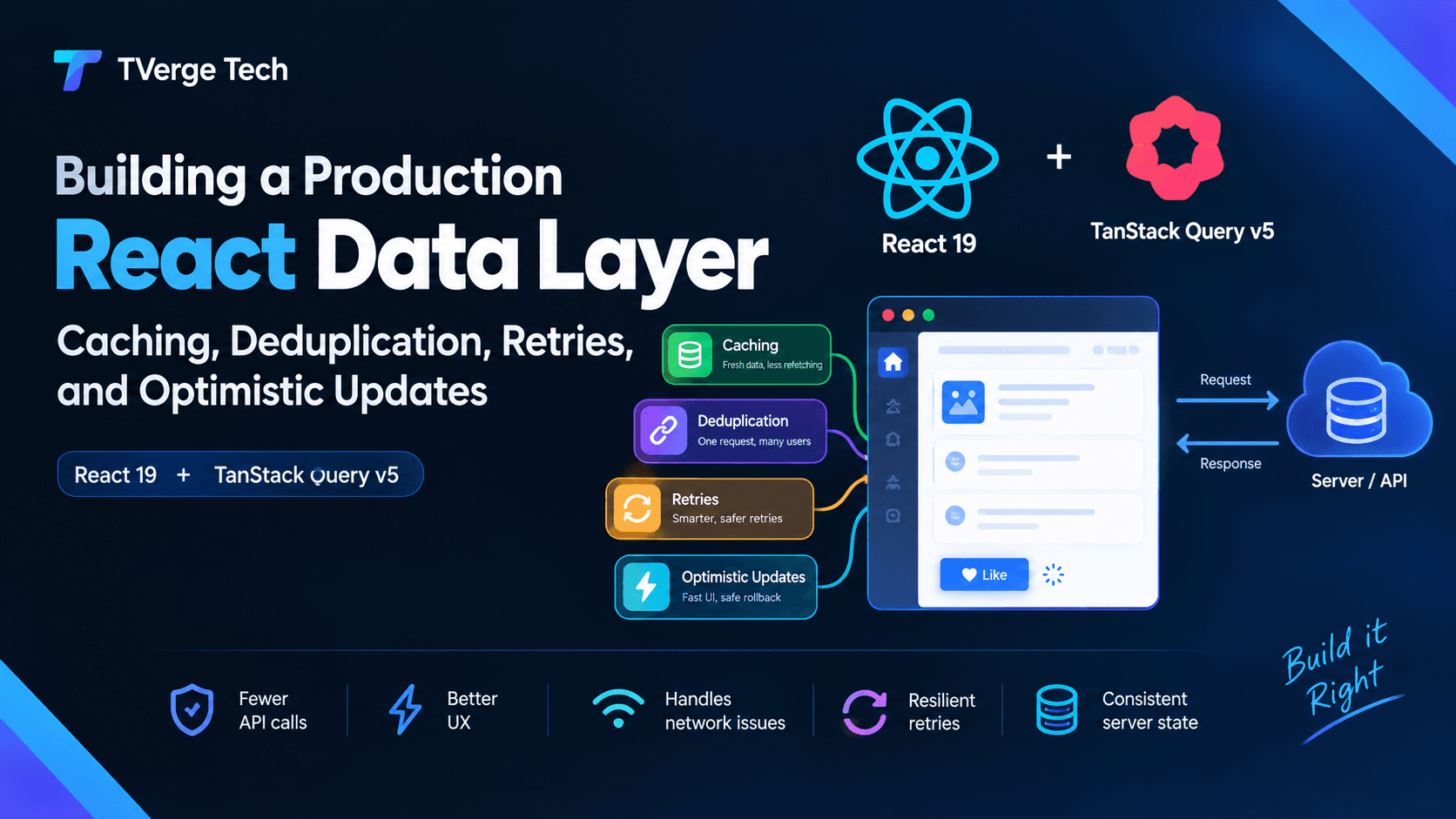
For a deeper look at caching, retries, and optimistic updates in a React data layer, see TVerge Tech's guide on building a production React data layer with TanStack Query.
The key design principle applies beyond any one library: store responses by the input that produced them, and render by the current input. When data is indexed by its cause, order stops mattering.
Server-Side Considerations
Client fixes are necessary, but a few server decisions make the whole system more robust.
Cancellation Doesn't Always Stop Server Work
When the client aborts a request, the browser closes or resets the stream. Whether your server stops doing work depends on your stack. Many servers keep running the query unless your code listens for the connection closing and stops early. For expensive searches, wire that up so abandoned requests don't consume database or CPU capacity.
Make Search Endpoints Safe to Repeat
Search requests are reads, so they should be idempotent and safe to retry or discard. This is also why aggressive cancellation is low risk for search but needs care for writes. If a request creates or modifies data, aborting on the client does not guarantee the server didn't process it. Use idempotency keys for writes rather than relying on cancellation.
Pair Client Cancellation with Server Protection
If a client is allowed to fire many requests quickly, apply sensible rate limiting and timeouts on the server. TVerge Tech's article on Go circuit breakers and retries covers resilient service patterns that complement the client-side techniques above.
Pagination and "Load More" Edge Cases
Out-of-order problems aren't limited to the first page of results. Consider infinite scroll:
The user searches "react" and scrolls, triggering a request for page 2.
Before it returns, the user changes the query to "vue".
The page-2 response for "react" arrives and gets appended to the "vue" list.
To prevent this:
Include the query in every pagination request's identity. Cache keys should look like ['search', query, page] or use a cursor tied to the query.
Reset the cursor and results when the query changes. Never carry a cursor across queries.
Abort pending pagination requests on a new search. Use the same controller that governs the main search.
A search interface that updates asynchronously needs to communicate changes to assistive technology, not only to sighted users:
Announce results politely. Use an ARIA live region (for example aria-live="polite") to announce a short summary such as "8 results available." Avoid announcing every intermediate update, which becomes noisy as results change.
Follow the combobox pattern for suggestions. If your search shows a dropdown of suggestions, the WAI-ARIA Authoring Practices combobox pattern describes the expected roles, keyboard interactions, and focus management.
Show loading and error states in text. Do not rely on color or spinners alone.
Stale-result bugs are also an accessibility problem. A screen reader user who hears results for "re" while the input says "react" has no visual cue to notice the mismatch.
Testing Out-of-Order Responses on Purpose
Because the bug depends on timing, you won't catch it reliably by clicking around. Write tests that control the order in which responses resolve.
Unit Test with Deferred Promises
function deferred<T>() {
  let resolve!: (value: T) => void;
  let reject!: (reason?: unknown) => void;
  const promise = new Promise<T>((res, rej) => {
    resolve = res;
    reject = rej;
  });
  return { promise, resolve, reject };
}

const jsonResponse = (body: unknown) =>
  new Response(JSON.stringify(body), {
    status: 200,
    headers: { 'Content-Type': 'application/json' },
  });

it('ignores a slow earlier response', async () => {
  const first = deferred<Response>();
  const second = deferred<Response>();

  const fetchMock = vi.fn()
    .mockReturnValueOnce(first.promise)
    .mockReturnValueOnce(second.promise);
  vi.stubGlobal('fetch', fetchMock);

  const render = vi.fn();
  const search = createSearch({ render }); // your function under test

  const a = search('re');
  const b = search('react');

  // The newer request finishes first...
  second.resolve(jsonResponse({ results: ['React'] }));
  await b;

  // ...then the older one arrives late
  first.resolve(jsonResponse({ results: ['Redux', 'Remix'] }));
  await a;

  expect(render).toHaveBeenLastCalledWith(['React']);
});
The test is written with Vitest-style helpers, but the idea transfers to Jest or any runner. The key is that you decide when each promise settles, which makes the race deterministic.
End-to-End Test with Delayed Routes
With a browser automation tool such as Playwright, you can delay specific network responses:
await page.route('**/api/search*', async (route) => {
  const q = new URL(route.request().url()).searchParams.get('q');
  if (q === 're') {
    await new Promise((r) => setTimeout(r, 1500)); // Make the early query slow
  }
  await route.continue();
});

await page.fill('#search', 're');
await page.fill('#search', 'react');

await expect(page.locator('[data-testid="results-heading"]')).toContainText('react');
Wait long enough for the delayed response to resolve, then assert that the UI still shows results for the latest query.
Observability: Measure What You Cancel
Once you have a fix, track whether the problem was real in your app. Useful signals include:
Cancelled request count. How many search requests are aborted per session? A high number suggests users type fast or your debounce is too short.
Dropped stale responses. If your token guard discards responses, log a counter. A rising count may point to slow backend queries.
Time to final results. Measure from the last keystroke to the moment correct results render.
Avoid logging raw search queries without considering privacy. Queries can contain personal information, so follow your privacy policy and data-retention rules.
Common Mistakes to Avoid
Treating AbortError as a failure. It is expected. Don't show an error message or send it to error tracking.
Creating one shared controller and never replacing it. Once aborted, a controller stays aborted. Create a fresh one for each request.
Forgetting to clear debounce timers in cleanup. A pending timer can fire after unmount and start an unwanted request.
Relying on debounce alone. It lowers request volume but doesn't fix ordering.
Clearing results immediately on every keystroke. This causes flicker. Keep previous results visible until new ones are ready.
Ignoring errors from newer requests. Guard against stale errors too, not only stale successes.
Appending paginated results without checking the query. This mixes results from different searches.
Skipping tests. Race conditions come back during refactors unless a test locks the behavior in.
Quick Implementation Checklist
Abort the previous request whenever a new search starts.
Add a "latest request wins" guard as a fallback.
Ignore AbortError and don't surface it as a failure.
Debounce input for efficiency, and don't treat it as a fix.
Key cached results by query, and render only the current key.
Reset pagination when the query changes.
Add a request timeout so loading states can't hang.
Announce results accessibly with a polite live region.
Test with deliberately reordered responses.
Make the server stop work for abandoned requests where it is expensive.
Frequently Asked Questions
What causes out-of-order network responses?
Responses arrive in the order they finish, not the order they started. Differences in query cost, server routing, caching, connection behavior, and network quality all affect completion time, so a later request can complete before an earlier one.
Is debouncing enough to prevent stale search results?
No. Debouncing reduces the number of requests, but two requests can still overlap when a user pauses and resumes typing. Use request cancellation or a latest-request guard for correctness.
Does aborting a fetch request stop the server from processing it?
Not necessarily. Aborting closes the client's side of the request. The server only stops if your code detects the closed connection and cancels the work. For expensive searches, implement that cancellation on the server too.
Should I use AbortController or a request ID?
Use AbortController as the primary tool because it also saves bandwidth and frees the connection. Add a request ID or echoed-query check as a safety net, especially when you use code that doesn't accept an abort signal.
Do I still need this if I use TanStack Query?
The library handles the core ordering problem by storing responses per query key and rendering the current key. You should still debounce input, pass the signal to your fetch call, and handle pagination keys carefully.
Can this bug affect things other than search?
Yes. Any UI that issues overlapping requests can show stale data: filters, autocomplete, dashboards, tab switches, and route-based data loading. The same principles apply: cancel obsolete work, key results by input, and render only what matches the current state.
Conclusion
Out-of-order network responses are not an exotic edge case. They're a natural result of asynchronous networks meeting fast-changing user input. The fix isn't one trick, it is a layered approach:
Cancel obsolete requests with AbortController.
Guard against late arrivals with request tokens or echoed queries.
Key your data by the input that produced it so order can't corrupt state.
Debounce to cut load, not to guarantee correctness.
Test with controlled response ordering so regressions get caught.
Build these habits into your search components once, ideally in a shared hook or data layer, and a whole class of "why is my UI showing the wrong results?" bugs will disappear.
3Docker Port Is Already Allocated: Fix It Without a Reboot