Node-API Native Addons: Writing C++ and Rust Extensions for Node.js Performance Bottlenecks
Most Node.js services never need native code. V8 is a capable JIT compiler, and the event loop handles I/O-heavy workloads well. But sooner or later some teams hit a wall: a hot loop in image processing, a hashing routine that shows up at the top of every flame graph, or a mature C library with no JavaScript equivalent.
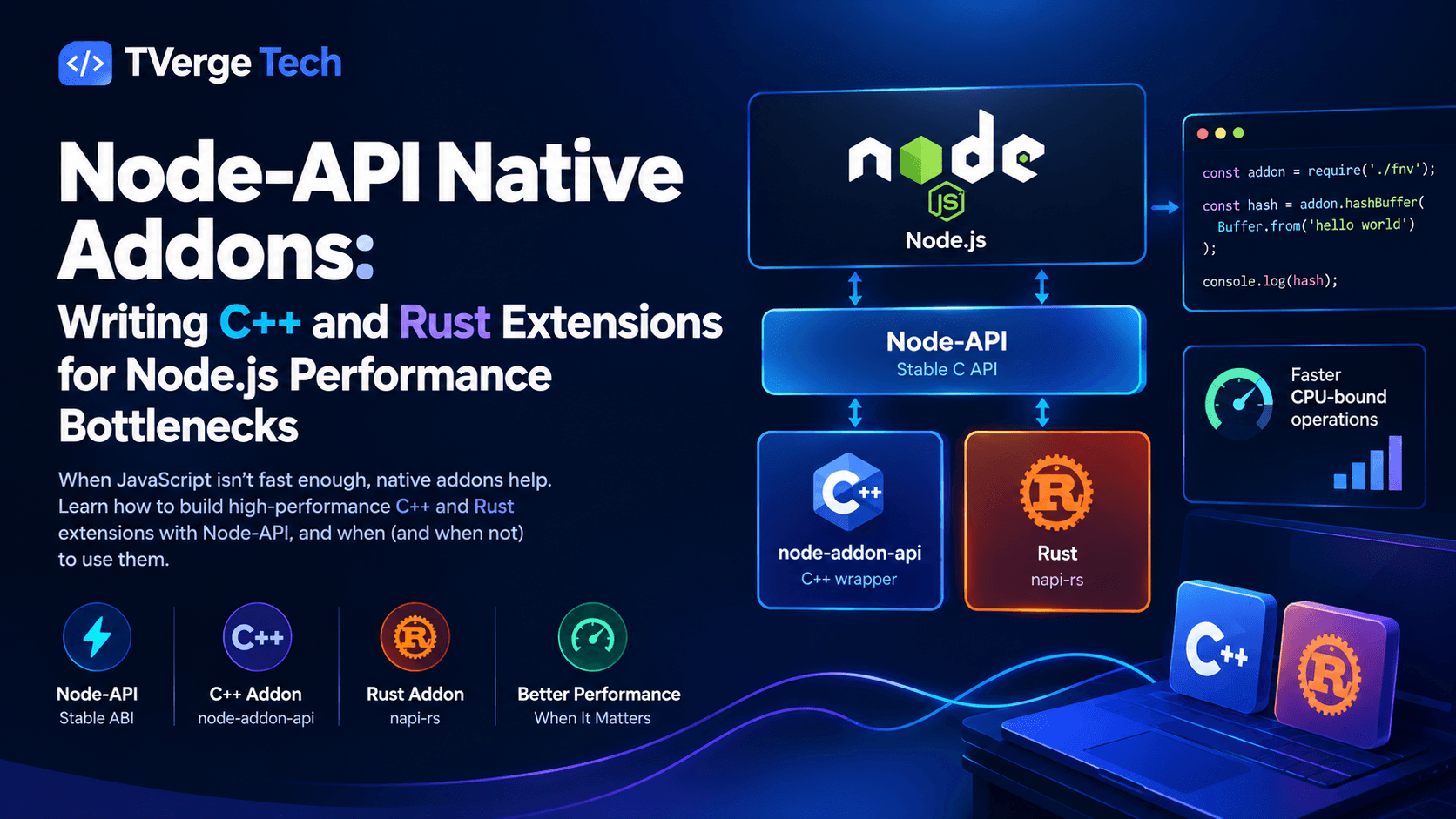
That is where native addons come in. A native addon is a compiled shared library that Node.js loads like any other module, and Node-API (formerly N-API) is the stable, officially supported way to write one. You can write the code in C or C++, or in Rust through community tooling such as napi-rs.
This guide covers how Node-API works, when an addon is the right tool, and how to build the same small extension twice, in C++ with node-addon-api and in Rust with napi-rs. It also covers the parts tutorials often skip: the cost of crossing the JavaScript/native boundary, keeping the event loop free, memory behavior, packaging, and honest benchmarking.
What Is Node-API and Why Does It Exist?
According to the official Node.js Node-API documentation, Node-API is a C API for building native addons that stays ABI-stable across Node.js versions. It is independent of the underlying JavaScript engine, so addon code doesn't call V8 directly.
Before Node-API, addons used V8 and Native Abstractions for Node.js (NAN). Both tied your code closely to V8's internals, so a Node.js major upgrade could break the build and force you to recompile or rewrite parts of the addon. Node-API removes most of that pain. You compile once against a Node-API version, and the binary works on later Node.js releases that support that version, with no recompile.
Node-API (C): the stable C interface that ships inside Node.js itself.
node-addon-api (C++): a header-only C++ wrapper maintained by the Node.js project. It's the most common way to write C++ addons because it is more ergonomic than the raw C functions. Its repository and documentation cover every class used in this guide.
napi-rs (Rust): a community framework that generates Node-API bindings from Rust macros and also produces TypeScript definitions. See the napi-rs documentation.
The older C++ addons page in the Node.js docs still documents raw V8-based addons, but for new projects the Node.js documentation recommends Node-API.
Should You Write a Native Addon at All?
An addon adds build complexity, platform-specific binaries, and a class of bugs (memory corruption, crashes) that pure JavaScript doesn't have. Before reaching for one, run through this checklist.
Good reasons to write an addon:
CPU-bound work with tight loops: numeric processing, parsing, compression, cryptography, image or audio transforms, where compiled code with predictable memory layout has a real advantage.
Reusing an existing native library: SQLite, a codec, a hardware SDK, or a proprietary C/C++ engine you don't want to rewrite.
Access to system APIs that Node.js doesn't expose.
Work that benefits from native multithreading without the cost of copying data between JavaScript worker threads.
Reasons to try something else first:
The bottleneck is I/O, not CPU. Native code won't make a slow database faster.
The algorithm is the problem. An O(n²) loop rewritten in C++ is still O(n²).
Worker threads would be enough. If your CPU-bound work is acceptable in JavaScript but blocks the event loop, the built-in worker_threads module offloads it with no native toolchain. We cover this in our guide to Worker Threads and Clustering in Node.js.
A WebAssembly module could do the job. WebAssembly gives you sandboxing and portability at some interop cost.
A maintained npm package already wraps the library. Check before writing your own bindings.
Profile first. If you haven't already, work through our notes on the Node.js event loop so you can tell whether the time is spent in computation or in waiting.
The Hidden Cost: Crossing the JavaScript/Native Boundary
The most common mistake in addon design is assuming "native is always faster." Every call from JavaScript into native code pays a fixed price: argument conversion, handle management, and engine bookkeeping. If the native function does very little, that overhead can outweigh any gain.
Two rules follow from this.
Rule 1: Make fewer, bigger calls. Instead of calling a native add(a, b) a million times from a JavaScript loop, pass one large buffer and do the loop in native code.
Rule 2: Avoid copying and converting data. Strings and objects have to be converted between JavaScript values and native types, which costs CPU and memory. Buffer and TypedArray objects expose a raw byte pointer, so a native function can read them without a copy. Prefer them for bulk data.
A useful mental model is to treat the addon like a network service with a very fast local connection: batch your requests and send compact payloads.
Project Setup: Toolchain and Build System
Native addons need a compiler on the machine that builds them. The Node-API documentation describes the build tooling options: node-gyp, CMake-based tooling, and prebuilt-binary approaches.
For C++ addons, node-gyp is the default. It needs Python, a C/C++ compiler (GCC or Clang on Linux and macOS, Visual Studio Build Tools on Windows), and make where applicable. Check the node-gyp README for the exact current requirements for your platform.
For Rust addons, you need a Rust toolchain installed via rustup, and the napi-rs CLI scaffolds the project for you.
If you learn better from complete working projects, the official node-addon-examples repository contains small, runnable samples for object wrapping, async work, thread-safe functions and more. They're a good companion to the walkthrough below.
Example: A Small CPU-Bound Function in C++ (node-addon-api)
We'll build a deliberately simple function: a 32-bit FNV-1a hash over a Buffer. It's CPU-bound, easy to verify, and demonstrates zero-copy buffer access. It isn't meant to replace Node's built-in crypto module; FNV-1a is a non-cryptographic hash, and it works as a clear teaching example.
NAPI_VERSION pins the Node-API version your addon targets. That choice determines which Node.js releases can load it, so check the Node-API version matrix in the official Node-API docs before picking a number. NAPI_DISABLE_CPP_EXCEPTIONS tells node-addon-api to report errors through pending JavaScript exceptions instead of C++ exceptions, which keeps the build simpler.
Step 3: Write src/addon.cc
#include <napi.h>
#include <cstddef>
#include <cstdint>

// Core algorithm: pure C++, no Node-API calls, safe to run on any thread.
static uint32_t Fnv1a(const uint8_t* data, size_t length) {
  uint32_t hash = 2166136261u;
  for (size_t i = 0; i < length; ++i) {
    hash ^= data[i];
    hash *= 16777619u;
  }
  return hash;
}

// Synchronous version: runs on the main thread.
Napi::Value Fnv1aSync(const Napi::CallbackInfo& info) {
  Napi::Env env = info.Env();

  if (info.Length() < 1 || !info[0].IsBuffer()) {
    Napi::TypeError::New(env, "Expected a Buffer as the first argument")
        .ThrowAsJavaScriptException();
    return env.Undefined();
  }

  Napi::Buffer<uint8_t> buf = info[0].As<Napi::Buffer<uint8_t>>();
  uint32_t result = Fnv1a(buf.Data(), buf.Length());
  return Napi::Number::New(env, result);
}

// Asynchronous version: hashes on a libuv thread-pool thread.
class Fnv1aWorker : public Napi::AsyncWorker {
 public:
  Fnv1aWorker(Napi::Env env, Napi::Buffer<uint8_t> buf)
      : Napi::AsyncWorker(env),
        deferred_(Napi::Promise::Deferred::New(env)),
        // Keep the Buffer alive until the worker finishes.
        bufRef_(Napi::Persistent<Napi::Object>(buf)),
        data_(buf.Data()),
        length_(buf.Length()) {}

  Napi::Promise GetPromise() { return deferred_.Promise(); }

 protected:
  // Runs off the main thread: do NOT touch any Napi:: JS values here.
  void Execute() override { result_ = Fnv1a(data_, length_); }

  // Back on the main thread: safe to create JS values.
  void OnOK() override {
    deferred_.Resolve(Napi::Number::New(Env(), result_));
  }

  void OnError(const Napi::Error& e) override {
    deferred_.Reject(e.Value());
  }

 private:
  Napi::Promise::Deferred deferred_;
  Napi::ObjectReference bufRef_;
  const uint8_t* data_;
  size_t length_;
  uint32_t result_ = 0;
};

Napi::Value Fnv1aAsync(const Napi::CallbackInfo& info) {
  Napi::Env env = info.Env();

  if (info.Length() < 1 || !info[0].IsBuffer()) {
    Napi::TypeError::New(env, "Expected a Buffer as the first argument")
        .ThrowAsJavaScriptException();
    return env.Undefined();
  }

  auto* worker =
      new Fnv1aWorker(env, info[0].As<Napi::Buffer<uint8_t>>());
  Napi::Promise promise = worker->GetPromise();
  worker->Queue();  // The worker frees itself after OnOK/OnError.
  return promise;
}

Napi::Object Init(Napi::Env env, Napi::Object exports) {
  exports.Set("fnv1a", Napi::Function::New(env, Fnv1aSync));
  exports.Set("fnv1aAsync", Napi::Function::New(env, Fnv1aAsync));
  return exports;
}

NODE_API_MODULE(fnv, Init)
A few things worth understanding in this code (the node-addon-api docs describe AsyncWorker, Persistent and Promise::Deferred in detail):
Execute() must not touch JavaScript values. It runs on a thread-pool thread, and Node-API calls are only valid on the main thread. Do pure computation there, and create results in OnOK().
The Persistent reference keeps the Buffer from being garbage-collected while a background thread reads its memory.
Shared mutable memory is your responsibility. If JavaScript modifies the buffer while the worker reads it, you have a data race. Either document that the buffer must not be touched until the promise settles, or copy the bytes first. Copying costs time, so pick based on your safety needs.
Step 4: Build and call it
npx node-gyp configure build
// index.js
const { fnv1a, fnv1aAsync } = require('./build/Release/fnv.node');

const input = Buffer.from('hello native world');

console.log(fnv1a(input));              // synchronous
fnv1aAsync(input).then(console.log);    // asynchronous, off the main thread
Example: The Same Function in Rust (napi-rs)
Rust gives you memory safety guarantees that C++ doesn't enforce, which matters when native code crashes would take down your entire Node.js process. The napi-rs documentation provides a CLI that scaffolds a project, including cross-platform build configuration and TypeScript type generation. The generated Rust API is documented on docs.rs, which is the place to confirm exact type and trait signatures for the version you install.
Step 1: Scaffold the project
npx @napi-rs/cli new fnv-native
Follow the prompts for package name and target platforms. Dependency versions change over time, so use the versions the scaffolder generates rather than copying them from a blog post.
Step 2: Write src/lib.rs
use napi::bindgen_prelude::*;
use napi_derive::napi;

fn fnv1a_hash(data: &[u8]) -> u32 {
    let mut hash: u32 = 2166136261;
    for &byte in data {
        hash ^= byte as u32;
        hash = hash.wrapping_mul(16777619);
    }
    hash
}

// Synchronous export: runs on the JavaScript thread.
#[napi]
pub fn fnv1a(data: Buffer) -> u32 {
    fnv1a_hash(&data)
}

// Asynchronous export: runs on Node's libuv thread pool.
pub struct Fnv1aTask {
    data: Buffer,
}

#[napi]
impl Task for Fnv1aTask {
    type Output = u32;
    type JsValue = u32;

    fn compute(&mut self) -> Result<Self::Output> {
        Ok(fnv1a_hash(&self.data))
    }

    fn resolve(&mut self, _env: Env, output: Self::Output) -> Result<Self::JsValue> {
        Ok(output)
    }
}

#[napi]
pub fn fnv1a_async(data: Buffer) -> AsyncTask<Fnv1aTask> {
    AsyncTask::new(Fnv1aTask { data })
}
Notice how much boilerplate the #[napi] macro removes. The function name fnv1a_async becomes fnv1aAsync in JavaScript, and the CLI generates matching TypeScript declarations. The napi-rs docs describe AsyncTask as the right choice for bounded blocking work that fits Node's shared libuv thread pool. For Rust async I/O, they recommend #[napi] async fn running on a Tokio runtime instead.
Both implementations return the same value for the same input, which makes a handy correctness test. Always test native code against a pure-JavaScript reference implementation before trusting it.
Keeping the Event Loop Free: Sync vs Async vs Threadsafe Functions
Node.js runs your JavaScript on a single main thread. If a native function runs for 200 ms on that thread, every other request waits 200 ms. Choosing the right execution model matters as much as the algorithm.
Situation
Approach
Notes
Work finishes in microseconds
Synchronous function
Lowest overhead, simplest code
Work takes milliseconds or longer
AsyncWorker (C++) or AsyncTask (Rust)
Runs on the libuv thread pool and returns a Promise
Native threads need to call back into JavaScript
ThreadSafeFunction (C++) or ThreadsafeFunction (Rust)
Safe way to schedule JS calls from other threads
Rust async I/O
#[napi] async fn
Runs on a Tokio runtime managed by napi-rs
Remember that the libuv thread pool is shared. It defaults to four threads and is also used by file system operations, DNS lookups and some crypto functions. If your addon saturates it with long tasks, unrelated parts of your application can slow down. Size the pool deliberately (the UV_THREADPOOL_SIZE environment variable controls it) or manage your own native thread pool for heavy workloads. The node-addon-examples repository includes working thread-safe function samples if you need native threads to call back into JavaScript.
For work that needs very large buffers processed in chunks, combine your addon with streams so memory stays bounded. Our guide on Node.js streams and backpressure shows the pattern.
Memory, Lifetimes, and Garbage Collection
Native addons live in two memory worlds, and bugs usually hide in the gap between them.
Handles and scopes (C++). JavaScript values you touch in native code are referenced through handles, and handles are only valid within a handle scope. node-addon-api manages most of this automatically, but when you loop over many values in native code, create a Napi::HandleScope per iteration so you don't pile up handles. The Node-API docs on object lifetime management explain the underlying model.
Persistent references. If a native object must hold a JavaScript value beyond the current call (like our bufRef_ above), use a persistent reference. Forgetting to release one leaks memory, and releasing one too early causes use-after-free.
Finalizers. When a JavaScript object wraps a native resource, register a finalizer so the native memory is freed when the object is garbage-collected. In C++ you'd use Napi::ObjectWrap (which calls the destructor), and in Rust napi-rs handles drop semantics through its ownership model.
External memory accounting. V8 only knows about the memory it allocates. If your addon allocates large native buffers, tell the engine through the Node-API external-memory adjustment function (exposed in node-addon-api as Napi::MemoryManagement::AdjustExternalMemory). Otherwise the garbage collector may not run when it should, and your process's resident memory can grow. If you run Node.js in containers with tight memory limits, read our guide to V8 garbage collection tuning for containers alongside this one, since native allocations don't count toward --max-old-space-size.
Worker thread compatibility. If users might load your addon from multiple threads created with worker_threads, make the module context-aware and avoid process-wide mutable globals. Node-API provides per-instance data for this purpose, documented in the Node-API reference.
Error Handling and Safety
Validate all input at the boundary: types, lengths, ranges. Native code that trusts bad input can crash the whole process, which is far worse than a JavaScript exception.
Throw JavaScript errors, not native exceptions or panics, across the boundary. In C++, use Napi::Error and its subclasses. In Rust, return napi::Result and let napi-rs convert the error.
Don't let a Rust panic cross the boundary. Return errors through Result instead of calling unwrap() on untrusted input.
Use sanitizers during development. AddressSanitizer and Valgrind catch many native memory bugs that never show up in ordinary tests.
Treat native dependencies like any other supply-chain risk. Pin versions, audit what you link, and rebuild on security updates.
Rust reduces some risks but doesn't eliminate them. Any unsafe block, and any C library you call through FFI, can still cause undefined behavior. The chapter on unsafe in The Rust Programming Language book is worth reading before you write any.
Packaging and Distribution
An addon that builds on your laptop isn't yet a shippable package. Users installing it may not have a compiler, and your build matrix includes operating systems and CPU architectures. The usual options:
Compile on install. Users need a toolchain, typically node-gyp and its prerequisites. This is the simplest approach to set up, but it frustrates users on machines without compilers, so it's a poor default for public packages.
Ship prebuilt binaries. Build for each platform in CI and publish the binaries, then have your package pick the right one at install or load time. Because Node-API is ABI-stable, one binary per OS/architecture pair covers many Node.js versions.
Use napi-rs's platform package convention. The CLI generates separate per-platform npm packages, and your main package lists them as optional dependencies so the package manager downloads only the one that matches the user's machine. The napi-rs documentation walks through the CI setup.
Whichever route you take, test on every platform you claim to support, including musl-based Linux (such as Alpine) if you publish for containers. Binaries built against glibc don't run on musl.
How to Benchmark Honestly
Native addons attract exaggerated performance claims. To produce numbers you can defend:
Benchmark the whole call, not just the inner loop. Include argument conversion and result conversion, since that's what your application pays.
Warm up first. V8's JIT needs iterations before the JavaScript baseline reaches steady state. Comparing a cold JavaScript run against native code is unfair.
Use realistic input sizes. An addon often loses on tiny inputs and wins on large ones. Find the crossover point for your workload and write it down.
Compare against a good JavaScript baseline. Check whether a built-in (like crypto, zlib, or a TypedArray method) already does the job natively.
Measure latency under load, not just throughput. An addon that blocks the main thread can improve throughput on a single call and wreck tail latency for everything else.
Report the environment: Node.js version, CPU, OS, and build flags (release builds with optimization enabled).
A minimal harness using only the standard library:
const { performance } = require('node:perf_hooks');
const { fnv1a } = require('./build/Release/fnv.node');

function jsFnv1a(buf) {
  let hash = 2166136261;
  for (let i = 0; i < buf.length; i++) {
    hash ^= buf[i];
    hash = Math.imul(hash, 16777619);
  }
  return hash >>> 0;
}

function bench(label, fn, buf, iterations) {
  for (let i = 0; i < 50; i++) fn(buf); // warm-up
  const start = performance.now();
  for (let i = 0; i < iterations; i++) fn(buf);
  const ms = performance.now() - start;
  console.log(`${label}: ${(ms / iterations).toFixed(4)} ms per call`);
}

for (const size of [64, 4096, 1_048_576]) {
  const buf = Buffer.alloc(size, 7);
  console.log(`--- ${size} bytes`);
  console.log('results match:', jsFnv1a(buf) === fnv1a(buf));
  bench('JavaScript', jsFnv1a, buf, 2000);
  bench('Native addon', fnv1a, buf, 2000);
}
Run it on your own hardware and see where the crossover lands. For a simple loop like this one, V8 does well, and the gap may be smaller than you expect. That is a useful finding in itself. If you run into slow or messy test fixtures while building benchmark inputs, our free JSON Formatter & Validator and Bulk UUID/GUID Generator can speed up preparing sample data. For broader runtime-level comparisons, see our Bun vs Node.js production benchmarking guide.
C++ vs Rust: Which Should You Choose?
Factor
C++ (node-addon-api)
Rust (napi-rs)
Memory safety
Manual discipline required
Enforced by the compiler outside unsafe
Existing native libraries
Direct access to C/C++ libraries
Needs FFI bindings or a Rust equivalent
Boilerplate
More explicit glue code
Macros generate most glue and TypeScript types
Build setup
node-gyp (Python and a C++ toolchain)
Cargo and the napi CLI
Cross-platform prebuilds
Tooling available, more manual
Well-supported workflow in the CLI
Learning curve
Familiar to C++ teams; pitfalls in lifetimes and handles
Steeper initially (ownership, borrowing)
Maintainer
node-addon-api is part of the Node.js organization
napi-rs is a community project
A practical rule: if you're wrapping an existing C or C++ library, use C++. If you're writing new performance-sensitive logic, Rust is usually the safer choice, especially for a team that will maintain it for years. If Rust's ownership model is new to you, The Rust Programming Language book is the standard starting point. Both approaches rely on the same underlying Node-API, so you aren't locked in at the runtime level.
Common Pitfalls Checklist
Calling Node-API functions from a non-main thread (use a thread-safe function instead).
Forgetting a HandleScope in long native loops.
Letting a persistent reference outlive the environment, or never releasing it.
Assuming a Buffer's memory is stable if JavaScript can modify or detach it while native code reads it.
Passing large strings or nested objects across the boundary on every call.
Blocking the libuv thread pool with long tasks and starving file and DNS operations.
Shipping only one platform's binary.
Skipping a pure-JavaScript fallback or reference test.
Frequently Asked Questions
What is the difference between N-API and Node-API?
They are the same thing. The project was originally called N-API and was renamed Node-API. You'll still see both names in older articles and in some function and macro names, such as napi_* and NAPI_VERSION. The official Node-API documentation uses the current name.
Do I need to recompile my addon for every Node.js version?
Not for Node-API addons. Because Node-API is ABI-stable, a binary built against a given Node-API version keeps working on later Node.js releases that support that version. You still need separate binaries per operating system and CPU architecture.
Is a native addon always faster than JavaScript?
No. Native code often wins on CPU-bound work with large inputs, but V8 is very good at simple loops, and crossing the boundary has a cost. Benchmark with realistic data before committing.
Should I use node-addon-api or the raw C Node-API?
Most C++ projects should use node-addon-api. It is maintained by the Node.js project, wraps the C API with C++ classes, and reduces boilerplate and error-handling mistakes. The raw C API makes sense if you need maximum control or want to avoid C++ entirely.
Can native addons run inside worker threads?
Yes, if the addon is written to be context-aware. Avoid mutable global state shared across environments and use Node-API's per-instance data facilities so each worker gets its own state. See the worker_threads documentation for how workers are created and isolated.
Is Rust or C++ better for Node.js native addons?
It depends on your goals. Rust offers stronger memory safety and modern tooling, while C++ gives direct access to the vast C/C++ library ecosystem. The comparison table above can help you decide.
How do I debug a crashing native addon?
Build with debug symbols, run under a debugger such as gdb or lldb, and use AddressSanitizer or Valgrind to find memory errors. For Rust, check for unsafe blocks and run your test suite with Miri where applicable.
Conclusion
Node-API gives Node.js developers a stable, officially supported way to move genuine bottlenecks into compiled code. The workflow that holds up in production is:
Profile and confirm the bottleneck is CPU-bound computation.
Try cheaper options first: a better algorithm, worker threads, or an existing package.
Design the boundary carefully: few calls, bulk data, Buffers over strings.
Keep the event loop free with async workers or tasks for anything that takes more than a moment.
Validate input, manage memory explicitly, and test against a JavaScript reference.
Ship prebuilt binaries for every platform you support.
Benchmark honestly and keep the numbers with your code.
Choose C++ when you're bridging existing native libraries, and Rust when you're writing new performance-critical logic and want the compiler's help avoiding memory bugs. Either way, treat the addon as a small, well-tested component with a narrow interface, not a way to rewrite your application.
Code samples are provided for educational purposes. Always test native extensions thoroughly in your own environment before deploying them to production, and verify API signatures against the documentation for the versions you use.