Smooth animation in React is rarely about writing faster code. It is about understanding when React does work, how much it does, and whether that work lands in the same 16.7 ms window the browser needs to paint a frame. Once you can read the reconciliation loop the way React's scheduler reads it, most "mysterious" jank stops being mysterious.
This guide walks through the Fiber architecture from the point of view of someone who has to ship a heavy animated interface: dashboards, canvas-adjacent visualizations, drag-and-drop boards, scroll-linked effects. You will learn what a fiber actually is, how the render and commit phases differ, why some updates can be interrupted and others cannot, and how to design components so that React stays out of the animation's way.
Who this is for: developers comfortable with hooks who want a mental model of React internals that translates directly into performance decisions. The examples target React 18 and 19 behavior as documented on react.dev.
Table of Contents
- What "Fiber architecture" means in practice
- The frame budget: why animations expose reconciliation cost
- Anatomy of a fiber node
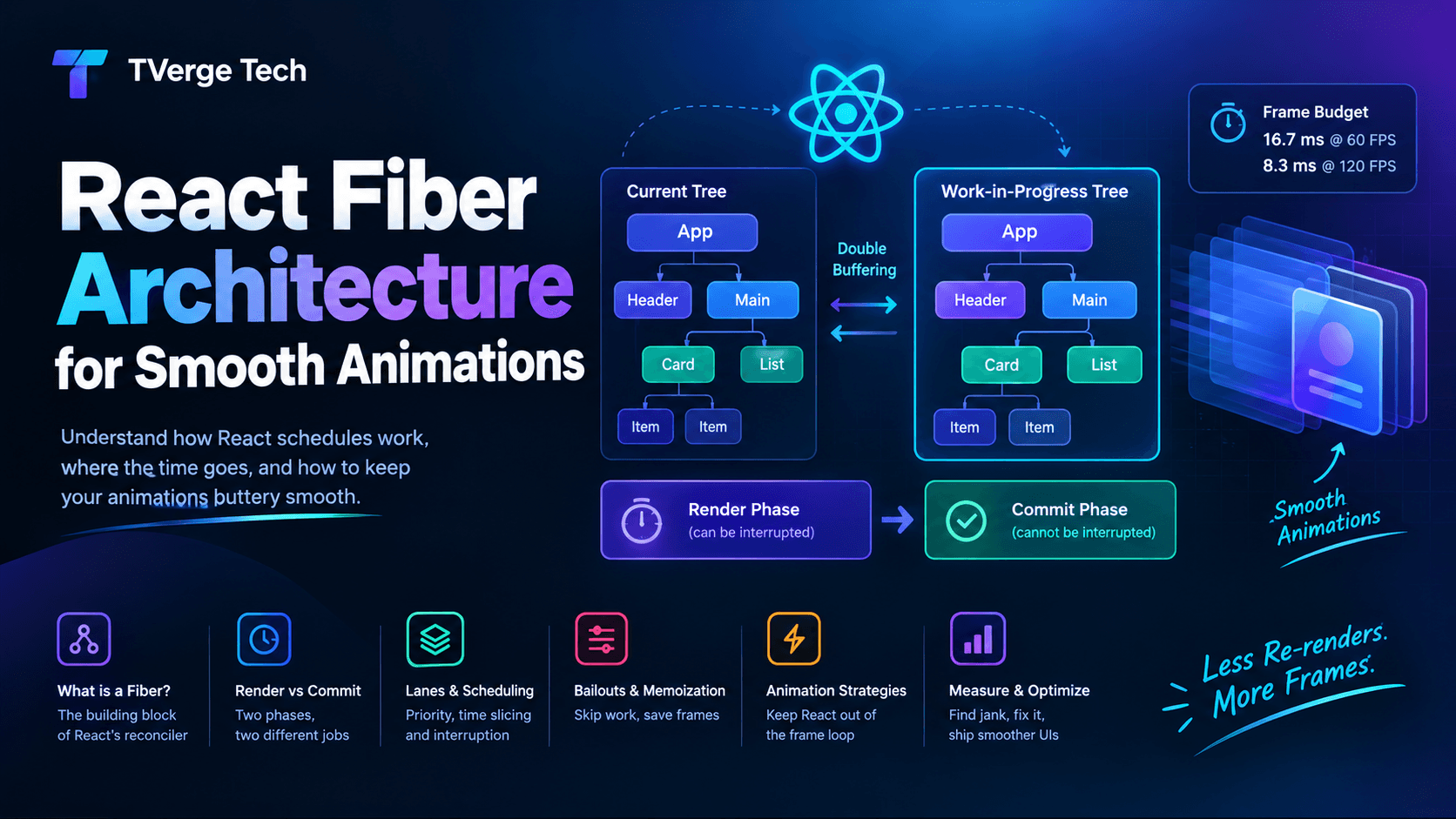
- Double buffering: current and work-in-progress trees
- The render phase, step by step
- The commit phase and why it cannot be interrupted
- Lanes, scheduling, and time slicing
- Bailouts: how React skips work
- Strategy 1: keep per-frame values out of React state
- Strategy 2: shrink and isolate the re-render surface
- Strategy 3: mark heavy work as non-urgent
- Strategy 4: animate compositor-friendly properties
- Measuring before and after
- Common mistakes
- A practical checklist
- FAQ
What "Fiber architecture" means in practice
Fiber is the name of the reconciler architecture introduced in React 16 and still the foundation of React today. The React documentation describes React elements as the objects that represent your UI, and it notes that React also uses internal objects called fibers to hold additional information about the component tree. In other words, the "virtual DOM" you hear about is really two layers: the lightweight element objects your components return, and the richer fiber tree React maintains internally to track state, effects, and scheduling.
Two ideas make Fiber relevant to animation:
- Work is represented as data. Because each unit of work is a plain object connected by pointers rather than a frame on the JavaScript call stack, React can stop in the middle of a render and pick up later.
- Work has priority. Updates are tagged with lanes, so a text-input keystroke can be treated as more urgent than a filtered list that is still computing.
Neither idea makes animation automatic. They give you levers. This article is about how to pull them.
The frame budget: why animations expose reconciliation cost
At 60 frames per second, the browser has roughly 16.7 ms to run JavaScript, calculate styles, perform layout, paint, and composite. On a 120 Hz display, that budget is about 8.3 ms. Any single long task on the main thread eats into it, and if it overruns, the browser skips a frame. Users perceive that as stutter.
A React render is JavaScript on the main thread. If an update triggers a render that takes 40 ms, an animation that depends on the main thread loses roughly two frames. The longer and more frequent your renders, the more visible the problem.
This is why heavy animations are an excellent stress test for your component architecture. They reveal two kinds of waste:
- Frequency waste: re-rendering on every frame when nothing structural changed.
- Scope waste: re-rendering a large subtree when only a small part is affected.
Fiber gives React the ability to be polite about long work, but it cannot make unnecessary work free.
Anatomy of a fiber node
A fiber is a JavaScript object that corresponds to one component instance, host element (like a div), or other node type in your tree. You never create or touch fibers directly, but knowing their shape explains React's behavior. Conceptually, a fiber carries:
Field (conceptual) Purpose type and key Identify what the node is. Used to decide whether to reuse or replace it. stateNode The underlying instance, such as the real DOM node for a host element. return, child, sibling Pointers that form a linked tree: parent, first child, next sibling. pendingProps / memoizedProps Incoming props for this render vs. the props from the last completed render. memoizedState Hook state for function components (a linked list of hooks). updateQueue Pending state updates and effects. flags Bit flags describing side effects to perform at commit (placement, update, deletion, and so on). lanes / childLanes Priority bookkeeping: does this fiber, or anything below it, have pending work? alternate Pointer to the matching fiber in the other tree (more on this next). Field names and internals can change between React versions, and they are not public API. Treat this table as a mental model, not a contract.
The key insight is the linked structure. Because child, sibling, and return are pointers, React can walk the tree with a loop instead of recursion. A loop can be paused after any node and resumed later. A recursive call stack cannot.
Double buffering: current and work-in-progress trees
React keeps two fiber trees:
- The current tree reflects what is on screen right now.
- The work-in-progress tree is the one React builds while processing an update.
Each fiber's alternate pointer links it to its counterpart in the other tree. When React starts a render, it creates or reuses alternates and mutates them freely, leaving the current tree untouched. When the render completes and the commit phase finishes applying changes, the work-in-progress tree becomes the new current tree.
This is the same double-buffering idea used in graphics: draw the next frame off-screen, then swap. Its practical consequence for you is important: a render that never commits has no visible effect. React can start rendering, decide a more urgent update arrived, throw away the work-in-progress tree, and begin again. This is exactly what makes concurrent features possible, and it is also why render functions must be pure. If rendering has side effects, abandoned renders will leak them.
The render phase, step by step
The official guide on render and commit describes the process in three steps: triggering a render, rendering the components, and committing to the DOM. Fiber's internal render phase is the second step, and it works like this:
- Trigger. A state update, a context change, or a parent re-render schedules work on a root and assigns it a lane.
beginWorkdescends. Starting at the root, React processes one fiber at a time. For a function component, it calls your component function, runs hooks, and receives the returned elements. It then reconciles those elements against the existing child fibers.- Reconciliation heuristics decide reuse. React compares the new element with the old fiber at the same position. Same type and key means the fiber is reused and updated with new props. A different type means the old subtree is unmounted and a new one mounted. Keys let React match children in lists across reorderings. The documentation on rendering lists and on preserving and resetting state explains how position and type determine whether state survives.
completeWorkascends. When a fiber has no more children to process, React completes it: for host elements, it prepares the DOM node (without inserting it yet) and bubbles flags and lane information up to the parent.- Repeat until the root is complete.
Notice what the render phase does not do: it does not touch the live DOM. It builds a description of what should change. That makes it safe to pause, abandon, or restart.
Why "virtual DOM diffing" is only half the story
Many explanations stop at "React diffs two trees and applies the minimal changes." That is true but incomplete for performance work. The diffing itself is usually cheap compared with the other costs in the render phase: executing your component functions, computing derived values, and creating thousands of element objects. In heavy-animation scenarios, the expensive part is typically your code running during render, not React's comparison logic.
The commit phase and why it cannot be interrupted
After the render phase completes, React enters the commit phase, where it applies the collected effects to the DOM and runs layout effects and, afterward, passive effects. React documents that useLayoutEffect fires before the browser repaints, which is why it is appropriate for measuring layout but a risk if it does heavy work.
The important property: the commit phase is synchronous. Once React begins mutating the DOM, it finishes. Time slicing applies to rendering, not to committing. The practical implications:
- A render that touches thousands of nodes can be sliced, but the resulting DOM mutations arrive together.
- Heavy work inside
useLayoutEffectblocks painting, because it runs before the browser gets a chance to paint. - Large commits cause long frames even when the render phase was well behaved.
If your profiler shows a long commit, the fix is usually to reduce how many nodes change, not to reschedule work.
Lanes, scheduling, and time slicing
React assigns each update to a lane, a bit in a bitmask representing priority. Discrete user events such as clicks and key presses get high-priority lanes. Updates wrapped in a transition get lower-priority transition lanes. React processes the highest-priority pending lane first.
For concurrent renders, React works in small slices and checks whether it should yield to the browser. This is called time slicing. Between slices, the browser can handle input and paint. If a higher-priority update arrives mid-render, React can abandon the in-progress transition work and handle the urgent update first, then restart the interrupted render.
Two clarifications prevent common misunderstandings:
- Not every render is interruptible. Urgent updates, such as those caused directly by discrete events, render synchronously. Interruptibility applies to concurrent renders such as transitions and deferred values.
- Concurrency does not reduce total work. It reorders and splits it. A 200 ms render is still 200 ms of CPU time, even if it is spread across many slices.
Bailouts: how React skips work
The cheapest render is the one that does not happen. During beginWork, React checks whether a fiber can bail out:
- If the fiber's props are identical by reference (
Object.is) to the previous props, the component's own state and context have not changed, and there is no pending update on it, React can skip calling the component. - If a fiber bails out but its descendants have pending work (tracked via
childLanes), React clones the child fibers and continues down only the branches that need attention.
This explains a key behavior many developers learn the hard way: when a parent re-renders, all of its children re-render by default, because the parent creates new element objects with new props objects. The bailout check fails by reference, so React proceeds into each child.
The tool that changes this is memo. It wraps a component so React skips re-rendering it when its props are shallowly equal to the previous props. The React documentation also describes the React Compiler, which can apply memoization automatically in supported setups; see React Compiler for current guidance on adoption. Whether you rely on the compiler or on manual memoization, the underlying principle is the same: stable inputs allow React to skip work.
Strategy 1: keep per-frame values out of React state
The single biggest mistake in animated React interfaces is driving a 60 fps animation through setState. Every frame schedules a render, React walks part of the tree, and your animation is now at the mercy of reconciliation cost.
Anti-pattern: animation frame drives state
import { useEffect, useState } from "react";

function BouncingBall() {
  const [x, setX] = useState(0);

  useEffect(() => {
    let id;
    const tick = () => {
      setX((value) => (value + 2) % 400); // a render on every frame
      id = requestAnimationFrame(tick);
    };
    id = requestAnimationFrame(tick);
    return () => cancelAnimationFrame(id);
  }, []);

  return (
    <Scene>
      <Ball style={{ transform: `translateX(${x}px)` }} />
      <HeavyChart /> {/* re-renders 60 times per second unless memoized */}
    </Scene>
  );
}
This works for a trivial demo and collapses as soon as Scene contains meaningful work.
Better: write directly to the DOM through a ref
React does not need to know the ball's position on every frame. The position is transient presentation data, not application state. Use a ref to reach the element, as described in Manipulating the DOM with Refs, and let requestAnimationFrame schedule updates in sync with the browser's repaint.
import { useEffect, useLayoutEffect, useRef } from "react";

function useFrameLoop(callback) {
  const callbackRef = useRef(callback);

  // Always call the latest callback without restarting the loop.
  useLayoutEffect(() => {
    callbackRef.current = callback;
  });

  useEffect(() => {
    let id;
    let last = performance.now();

    const loop = (now) => {
      const delta = now - last;
      last = now;
      callbackRef.current(delta, now);
      id = requestAnimationFrame(loop);
    };

    id = requestAnimationFrame(loop);
    return () => cancelAnimationFrame(id);
  }, []);
}

function Ball() {
  const elementRef = useRef(null);
  const xRef = useRef(0);

  useFrameLoop((delta) => {
    xRef.current = (xRef.current + delta * 0.2) % 400;
    elementRef.current.style.transform = `translate3d(${xRef.current}px, 0, 0)`;
  });

  return <div ref={elementRef} className="ball" />;
}
Result: zero React renders per frame. The reconciliation loop is idle while the animation runs. React is only involved when something structural changes, such as mounting, unmounting, or switching modes.
Two cautions:
- Respect users who prefer reduced motion. Check the
prefers-reduced-motionmedia query and skip or simplify non-essential motion. This is both an accessibility requirement in practice and part of building a respectful interface. - Do not write to the DOM nodes React manages in ways that conflict with React's own updates to the same properties. Restrict imperative writes to properties (like
transform) that React does not also set for that element.
When state is the right tool: use state for things that change what the UI is (which panel is open, which items exist, what mode is active). Use refs and imperative animation for values that only change how it looks from frame to frame.
Strategy 2: shrink and isolate the re-render surface
When state must change, make the blast radius small. Fiber's bailout mechanics reward components that receive stable, narrow inputs.
Move state down
If only one small widget needs fast-changing state, put that state inside the widget rather than in a distant ancestor. Fewer fibers sit beneath the update, so beginWork visits fewer nodes.
Memoize expensive children with stable props
import { memo, useCallback, useMemo, useState } from "react";

const Row = memo(function Row({ item, onSelect }) {
  return (
    <li onClick={() => onSelect(item.id)}>
      {item.label}
    </li>
  );
});

function List({ items }) {
  const [selectedId, setSelectedId] = useState(null);

  const handleSelect = useCallback((id) => setSelectedId(id), []);
  const visibleItems = useMemo(() => items.slice(0, 200), [items]);

  return (
    <ul data-selected={selectedId}>
      {visibleItems.map((item) => (
        <Row key={item.id} item={item} onSelect={handleSelect} />
      ))}
    </ul>
  );
}
memo only helps when the props really are stable. An inline object or function created during the parent's render produces a new reference every time and defeats the shallow comparison. useMemo and useCallback exist to stabilize those references, but use them where profiling shows a benefit rather than everywhere by default.
Virtualize large collections
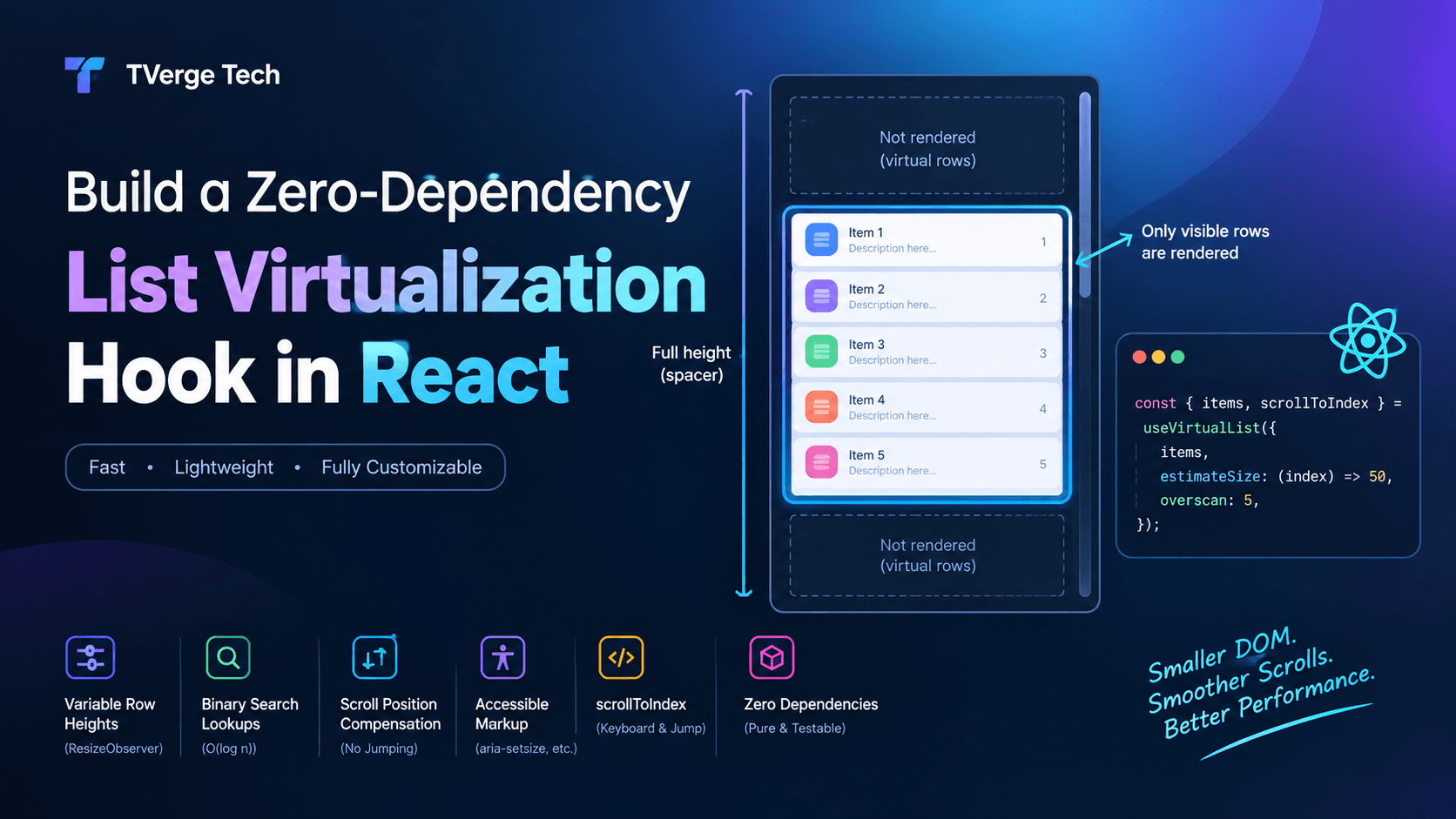
If an animation shares the screen with a list of thousands of rows, the cheapest fibers are the ones that do not exist. Rendering only the visible window dramatically reduces both render and commit cost. For a complete implementation, see our walkthrough on building a zero-dependency list virtualization hook in React.
Be deliberate with keys and component identity
Changing a key forces React to unmount and remount a subtree, discarding its fibers and state. Defining a component inside another component's body creates a new component type on every render, which makes React treat it as a different component each time and remount it. Both are common sources of animation restarts and wasted reconciliation work.
Strategy 3: mark heavy work as non-urgent
Sometimes you cannot avoid a heavy render: filtering a large dataset, recomputing a chart, switching a complex view. The goal then is to prevent that render from blocking more urgent updates.
React provides two primary tools, documented at useTransition and useDeferredValue. The official reference describes useTransition as a hook that lets you render a part of the UI in the background, and startTransition as the function that marks a state update as a Transition. Transition updates are non-blocking, so urgent interactions can interrupt them.
import { useState, useTransition } from "react";

function SearchPanel({ dataset }) {
  const [query, setQuery] = useState("");
  const [filter, setFilter] = useState("");
  const [isPending, startTransition] = useTransition();

  function handleChange(event) {
    const next = event.target.value;
    setQuery(next); // urgent: keep the input responsive

    startTransition(() => {
      setFilter(next); // non-urgent: heavy list re-render
    });
  }

  return (
    <>
      <input value={query} onChange={handleChange} aria-busy={isPending} />
      <ResultsList dataset={dataset} filter={filter} dimmed={isPending} />
    </>
  );
}
What happens at the Fiber level:
setQueryis an urgent update. React renders it synchronously, so typing never lags.setFilterruns inside a transition, so it gets a lower-priority lane. React renders the heavyResultsListin slices.- If the user types another character mid-render, React can abandon the in-progress transition render and restart it with the newer value. The interrupted work-in-progress tree is simply discarded, which is safe because the render phase has no side effects.
Use useDeferredValue when the value arrives from props or a custom hook and you cannot wrap the state setter yourself. It lets a stale value remain on screen while a fresh one renders in the background.
Be realistic about the limits. Transitions keep the interface responsive; they do not make a 300 ms render cheaper. If the work itself is too large, combine transitions with virtualization or moving computation off the main thread, for instance into a Web Worker.
Strategy 4: animate compositor-friendly properties
Even a perfectly tuned React tree cannot rescue an animation that forces the browser to recalculate layout on every frame. The browser's rendering pipeline has several stages, and different CSS properties trigger different amounts of work.
The web.dev guide on high-performance CSS animations advises checking a property's impact on the rendering pipeline before animating anything other than transform and opacity, and shows how to confirm in the browser's Performance panel whether an animation triggers layout or paint. MDN's animation performance guide covers the same ground and explains how the cost of animating a CSS property varies by property.
Practical rules:
- Prefer
transformandopacity. These can typically be handled by the compositor without re-running layout. - Avoid animating
top,left,width,height, or margins. These affect layout. - Be careful with animated shadows and filters. They can be paint-heavy. If you are designing shadow or gradient values, our free CSS Shadow & Gradient Generator lets you preview the output and copy the CSS, which makes it easier to test cheaper alternatives, such as animating the opacity of a pre-rendered shadow layer instead of animating the shadow itself.
- Use
will-changesparingly. It is a hint, not a magic switch, and overuse can increase memory consumption.
Let the browser run the animation
If an animation's endpoints are known, hand it to the browser. The Web Animations API lets you start animations from JavaScript while the browser handles interpolation, which often avoids main-thread work for compositor-friendly properties.
import { useEffect, useRef } from "react";

function Panel({ open }) {
  const ref = useRef(null);

  useEffect(() => {
    const element = ref.current;
    if (!element) return;

    const animation = element.animate(
      [
        { opacity: open ? 0 : 1, transform: open ? "translateY(12px)" : "none" },
        { opacity: open ? 1 : 0, transform: open ? "none" : "translateY(12px)" },
      ],
      { duration: 220, easing: "ease-out", fill: "forwards" }
    );

    return () => animation.cancel();
  }, [open]);

  return <div ref={ref}>Panel content</div>;
}
React renders once when open changes. The browser handles every intermediate frame. The reconciliation loop and the animation barely interact, which is the ideal outcome.
Measuring before and after
Never optimize animation performance by feel alone. Use two complementary tools.
1. The React Profiler. The Profiler component measures how often a tree renders and how long each render takes.
import { Profiler } from "react";

function onRender(id, phase, actualDuration) {
  // phase is "mount", "update", or "nested-update"
  console.log(`${id} [${phase}] rendered in ${actualDuration.toFixed(2)} ms`);
}

<Profiler id="Dashboard" onRender={onRender}>
  <Dashboard />
</Profiler>;
Look for components that render far more often than their inputs change, and for individual renders that exceed a few milliseconds. The Profiler is most meaningful in a development or profiling build; production builds strip most instrumentation unless you use a profiling build.
2. The browser's Performance panel. Record while the animation runs. Look for long tasks, frames that exceed budget, and whether time is going to scripting, style and layout, paint, or compositing. The web.dev guide linked above walks through this workflow. If scripting dominates, you have a React or application-code problem. If layout or paint dominates, you have a CSS problem, and no amount of memoization will fix it.
Also keep responsiveness in mind. Interaction to Next Paint (INP) measures how quickly a page responds to user interactions, and long renders triggered by interactions harm it. See web.dev's INP guide for what it measures and how to improve it.
Common mistakes
Putting rapidly changing values in context. Every consumer re-renders when a context value changes. Fast-changing values in widely consumed context create enormous reconciliation surfaces.
Over-memoizing without measuring. memo, useMemo, and useCallback have their own costs and add code complexity. Apply them to proven hot spots.
Doing layout reads and writes in alternating order. Reading layout properties (like offsetHeight) after writing styles forces the browser to recalculate layout synchronously. Batch reads first, then writes.
Heavy work in useLayoutEffect. It runs before paint, so expensive code there directly delays the next frame.
Mutating state objects. Mutations defeat reference-equality checks and can cause skipped or inconsistent updates.
Assuming transitions are free. They improve responsiveness, but the total CPU cost remains.
Animating through inline style objects that change identity every render. This creates new props on each render and breaks memo for the receiving component.
A practical checklist
Before shipping a heavy animated screen, walk through this list:
- Does any
requestAnimationFrameloop callsetState? If so, can the value live in a ref instead? - Is animated state located as low in the tree as possible?
- Are expensive children wrapped in
memo(or covered by the React Compiler) and receiving stable props? - Are large lists virtualized?
- Are heavy, non-urgent updates wrapped in
startTransitionor deferred withuseDeferredValue? - Do animations use
transformandopacitywherever possible? - Did you confirm with the browser Performance panel that layout and paint stay quiet during the animation?
- Does the React Profiler show a stable, low render count while the animation runs?
- Does the interface respect
prefers-reduced-motion? - Is the animation still acceptable on a mid-range mobile device, not just your development machine?
Putting it together: a mental model
Think of the browser frame as a budget and React as one of several spenders:
- The render phase spends budget running your components. You control this by reducing frequency and scope.
- The commit phase spends budget mutating the DOM, and it cannot be paused. You control this by changing fewer nodes.
- The scheduler decides when spending happens. You influence it by labeling work as urgent or non-urgent.
- The browser pipeline spends budget on layout, paint, and compositing. You control this through your choice of animated properties.
Fiber's linked-list traversal, double buffering, and lane-based scheduling make React flexible about when it works. They do not change the fundamental rule of performant animation: do the least possible work on the main thread during each frame. The best-performing animated React apps are the ones where, while the animation plays, React has nothing to do at all.
FAQ
Does React Fiber make animations faster automatically?
No. Fiber enables features such as time slicing and prioritized updates, which can keep the interface responsive during heavy renders. But if you drive an animation through state updates on every frame, you still pay the full render cost each time. The biggest wins come from reducing how much React does per frame.
Is the virtual DOM slow for animation?
The virtual DOM is not inherently the bottleneck. In practice, the cost comes from running many component functions and updating many DOM nodes. For frame-by-frame animation, bypassing React state and updating a single element's transform through a ref avoids that cost entirely.
Should I use CSS animations, the Web Animations API, or JavaScript with requestAnimationFrame?
Use CSS transitions or animations for simple, declarative effects. Use the Web Animations API when you need programmatic control over known keyframes. Use requestAnimationFrame for physics-driven or gesture-driven motion where values change continuously based on input. In all three cases, favor transform and opacity.
Can useTransition stop my animation from stuttering?
It can prevent a heavy state update from blocking urgent interactions, since React can interrupt transition renders. It does not reduce the amount of work, and it does not affect the commit phase, which is synchronous. Combine it with memoization and virtualization for best results.
When is it acceptable to animate with React state?
When the animation is infrequent and the affected subtree is small, such as toggling a menu or switching tabs. State-driven animation becomes a problem when updates occur at frame rate or when they re-render large trees.
Do I need to understand Fiber internals to write fast React code?
You do not need to read React's source code. But understanding the render and commit phases, bailouts, and priorities helps you predict why a change is slow and choose the right fix, instead of guessing.
Conclusion
Heavy animations and the Fiber reconciler meet at a single constraint: the main thread has one frame to do everything. Fiber gives React the structure to split rendering into slices, discard stale work, and prioritize urgent updates. Your job is to ensure React is asked to do as little as possible while the animation runs: keep frame-by-frame values outside state, isolate re-render surfaces, label heavy updates as non-urgent, and animate properties the browser can handle cheaply.
Start by profiling one animated screen in your application. Count renders per second while it runs, then apply the strategies above in order. Most teams find that the first strategy alone, moving per-frame values out of state, removes the majority of their jank.
For related reading, see our guides on Server-Driven UI in React and type-safe polymorphic components, and explore the free utilities in the TVerge Tech tools hub.