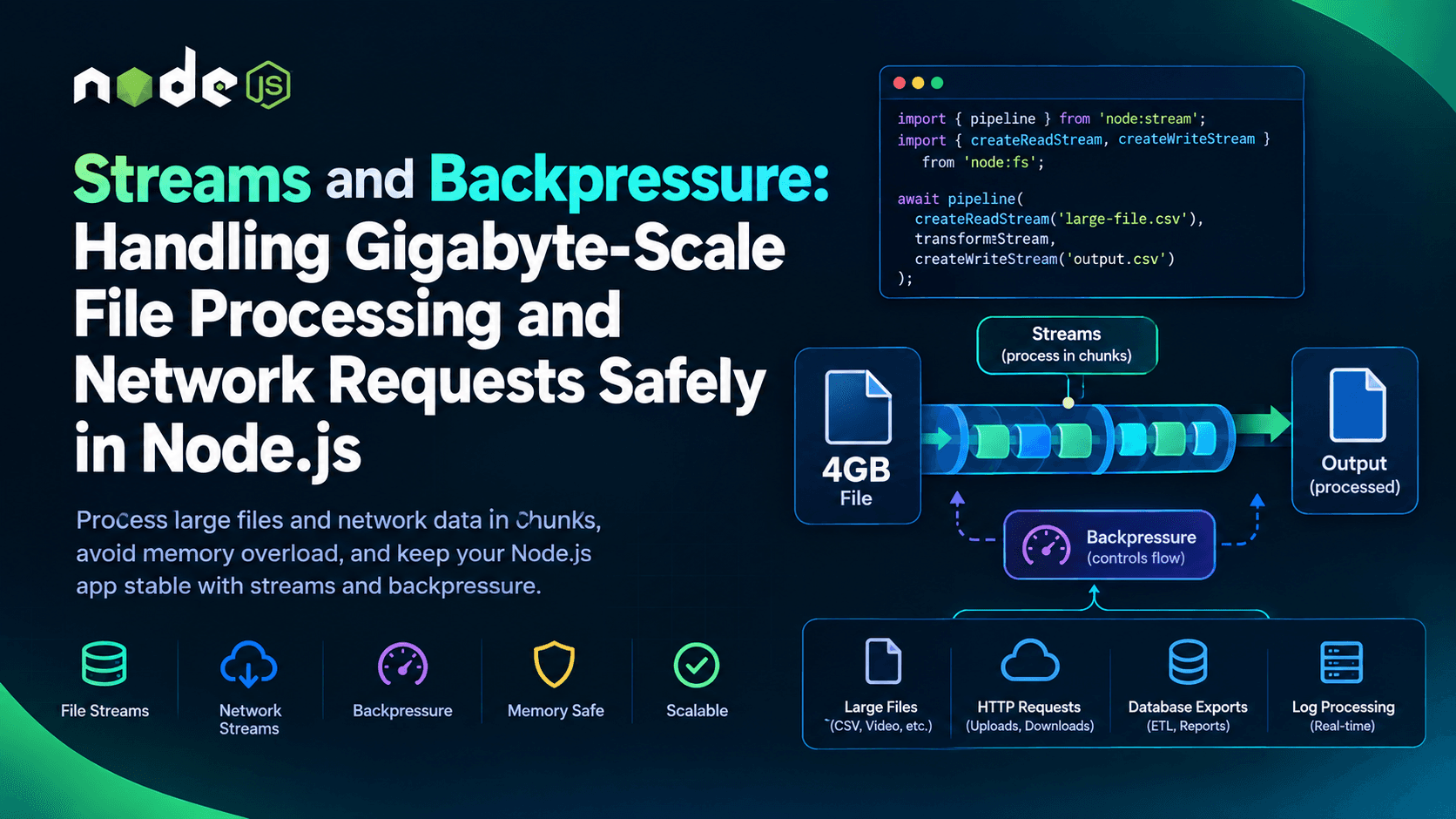
Streams and Backpressure: Handling Gigabyte-Scale File Processing and Network Requests Safely in Node.js
Every Node.js developer eventually hits the same wall: a script that works perfectly on a 10MB test file falls over in production when someone uploads a 4GB video, or a report-generation job that reads a database export line-by-line quietly climbs to 100% memory usage and gets killed by the OS. The root cause is almost always the same — the code loaded the entire payload into memory instead of processing it in chunks.
Node.js solved this problem at the platform level over a decade ago with streams, and it solved the hardest part of streams — flow control — with a mechanism called backpressure. Understanding both isn't optional if you're building anything that touches file uploads, large API responses, log processing, ETL pipelines, or proxying data between services. This guide walks through what streams and backpressure actually are, why naive code breaks at scale, and how to use pipeline() and memory-aware patterns to process gigabyte-scale data safely, without exhausting RAM or crashing your process.
Why "Just Read the File" Doesn't Scale
Consider the most intuitive way to copy a large file in Node.js:
js
const fs = require('node:fs');

const data = fs.readFileSync('input.csv');
fs.writeFileSync('output.csv', data);
This works fine for small files. But readFileSync buffers the entire file into memory as a single Buffer before writing a single byte back out. If input.csv is 4GB, Node.js needs to allocate roughly 4GB of heap just to hold that buffer — and Buffer instances in Node.js are subject to a maximum size limit, so extremely large files can fail outright rather than just being slow.
The same problem shows up on the network side. If an HTTP handler does req.on('data', chunk => buffer.push(chunk)) and waits for the full request body before processing it, a handful of concurrent large uploads can push the process past its memory ceiling and trigger an out-of-memory crash, taking down every other request being served at the same time.
Streams exist specifically to avoid this: instead of "load everything, then process it," Node.js processes data as a sequence of chunks, keeping only a small, bounded amount of data in memory at any given moment — regardless of whether the underlying file is 10 kilobytes or 40 gigabytes.
The Four Stream Types in Node.js
Node's built-in stream module, documented in the official Node.js Stream API reference, defines four fundamental abstractions:
- Readable — a source of data you consume, such as
fs.createReadStream()or an incoming HTTP request body. - Writable — a destination you write data to, such as
fs.createWriteStream()or an outgoing HTTP response. - Duplex — both readable and writable, independently (e.g., a TCP socket).
- Transform — a duplex stream that modifies data as it passes through, such as
zlib.createGzip()or a custom CSV parser.
A safe, streaming file copy looks like this instead of the buffered version above:
js
const fs = require('node:fs');

const readStream = fs.createReadStream('input.csv');
const writeStream = fs.createWriteStream('output.csv');

readStream.pipe(writeStream);
This already uses far less memory because data moves through in fixed-size chunks (governed by the stream's highWaterMark option). But .pipe() alone has gaps that matter once you're operating at scale — specifically around error handling and backpressure propagation across multiple chained streams.
What Backpressure Actually Is
Backpressure is the mechanism that keeps a fast data producer from overwhelming a slow data consumer. Picture a Readable stream reading a file off a fast NVMe disk at 500MB/s, piped into a Writable stream that's inserting rows into a database at 20MB/s. Without any coordination, the reader would keep producing chunks faster than the writer can drain them, and those unconsumed chunks pile up in an internal buffer until memory usage spirals out of control.
According to the official Node.js "Backpressuring in Streams" guide, the signal for backpressure is built directly into the Writable stream's .write() method: it returns false when the internal buffer has exceeded its highWaterMark, telling the producer to pause. When the writable side finishes draining its queue, it emits a 'drain' event, which is the producer's cue to resume sending data. This handshake — pause on false, resume on 'drain' — is backpressure.
Manually wiring this up looks something like:
js
function copyManually(readable, writable) {
  readable.on('data', (chunk) => {
    const canContinue = writable.write(chunk);
    if (!canContinue) {
      readable.pause();
      writable.once('drain', () => readable.resume());
    }
  });

  readable.on('end', () => writable.end());
}
This is instructive to see once, but it's also exactly the kind of low-level flow-control code Node.js provides higher-level tools to avoid writing by hand — because getting it wrong (forgetting to pause, mishandling errors mid-stream, leaking listeners) is one of the most common sources of production memory leaks in Node.js services.
Why pipeline() Should Be Your Default, Not .pipe()
The classic .pipe() method does propagate backpressure automatically between two streams, which is a big improvement over manual buffering. But .pipe() has a well-known weakness: it does not forward errors, and it does not automatically clean up (destroy) all the streams in a chain if one of them fails or is closed early. If a Transform stream in the middle of a pipe chain emits an error, the streams before and after it can be left open, leaking file descriptors or dangling connections.
This is precisely the gap that stream.pipeline() closes. As documented in the Node.js Stream API reference under stream.pipeline(), pipeline() chains any number of streams together, forwards backpressure the same way .pipe() does, but additionally guarantees that if any stream in the chain errors or closes, every other stream in that chain is properly destroyed and the error is surfaced through a single callback (or a resolved/rejected Promise, when using the promise-based version from node:stream/promises).
A safe, production-grade version of the earlier file copy, now with gzip compression added mid-stream, looks like this:
js
const fs = require('node:fs');
const zlib = require('node:zlib');
const { pipeline } = require('node:stream/promises');

async function compressFile(inputPath, outputPath) {
  await pipeline(
    fs.createReadStream(inputPath),
    zlib.createGzip(),
    fs.createWriteStream(outputPath)
  );
  console.log('Pipeline finished. All streams closed cleanly.');
}

compressFile('access.log', 'access.log.gz').catch((err) => {
  console.error('Pipeline failed:', err);
});
Notice what this buys you for free: backpressure between the read stream, the gzip Transform, and the write stream is handled automatically at every stage, and if the disk fills up mid-write, every stream in the chain — including the read stream still pulling from disk — is destroyed instead of leaking. This is why the official documentation and the wider Node.js ecosystem now treat pipeline() (or its promise-based counterpart) as the default choice over raw .pipe() chains for anything beyond a quick script.
Streaming Gigabyte-Scale HTTP Requests and Responses
The same principles apply directly to network I/O, which is where backpressure failures tend to be most costly because they affect every concurrent user of a server, not just one file operation.
Handling a large upload safely:
js
const http = require('node:http');
const fs = require('node:fs');
const { pipeline } = require('node:stream/promises');

const server = http.createServer(async (req, res) => {
  if (req.method === 'POST' && req.url === '/upload') {
    try {
      await pipeline(
        req,
        fs.createWriteStream('/tmp/uploaded-file')
      );
      res.writeHead(200);
      res.end('Upload complete');
    } catch (err) {
      res.writeHead(500);
      res.end('Upload failed');
    }
  }
});
Here, the incoming req object is itself a Readable stream. Piping it directly into a file write stream means the server never holds the full upload body in memory — whether it's 5MB or 5GB, memory usage stays bounded by the stream's internal buffer size, not the file size.
Streaming a large response, such as a generated report or a proxied download, follows the same shape:
js
const server = http.createServer(async (req, res) => {
  if (req.url === '/export.csv') {
    res.writeHead(200, { 'Content-Type': 'text/csv' });
    try {
      await pipeline(
        fs.createReadStream('/data/large-export.csv'),
        res
      );
    } catch (err) {
      // Handle client disconnects and stream errors here
    }
  }
});
If the client is on a slow connection, res.write() internally returns false once the socket's send buffer fills up, and pipeline() automatically pauses the file read stream until the client has drained enough of the response to continue — the same backpressure handshake, now operating across a network socket instead of a local disk.
Setting Sensible highWaterMark Values
Every stream has a highWaterMark option that controls how much data is buffered internally before backpressure kicks in. The Node.js Stream API documentation explains that the default is 16KB (in object mode, it defaults to 16 objects) for most streams. Raising this value can reduce the frequency of pause/resume cycles and slightly improve throughput for very fast disks or networks, at the direct cost of higher peak memory usage per stream.
js
const readStream = fs.createReadStream('bigfile.bin', {
  highWaterMark: 64 * 1024, // 64KB chunks instead of the 16KB default
});
For gigabyte-scale processing with many concurrent streams (for example, a server handling hundreds of simultaneous file uploads), it's usually safer to leave highWaterMark at or near its default and instead limit the number of concurrent streaming operations, rather than raising the per-stream buffer size and multiplying memory usage across every connection.
Monitoring Memory to Catch Leaks Before They Crash the Process
Streams reduce memory pressure, but they don't make it disappear entirely — a Transform stream that accumulates state internally (for example, building up an array of parsed rows instead of emitting them incrementally) can still leak memory even while technically "using streams." The Node.js process.memoryUsage() API is the standard way to verify that a streaming pipeline is actually behaving as expected under load:
js
setInterval(() => {
  const { rss, heapUsed, external } = process.memoryUsage();
  console.log({
    rssMB: (rss / 1024 / 1024).toFixed(1),
    heapUsedMB: (heapUsed / 1024 / 1024).toFixed(1),
    externalMB: (external / 1024 / 1024).toFixed(1),
  });
}, 5000);
A healthy streaming pipeline processing a growing file should show rss and heapUsed staying roughly flat over time, regardless of how much total data has passed through. If those numbers climb steadily and never plateau while a large job runs, that's a strong signal that something in the pipeline — often a custom Transform stream — is buffering more than it should instead of releasing chunks once they're processed.
Common Mistakes That Reintroduce Buffering
A few patterns quietly defeat the purpose of streaming even when developers believe they're "using streams correctly":
- Collecting chunks into an array before processing them. Code like
readable.on('data', chunk => chunks.push(chunk))followed byBuffer.concat(chunks)after the stream ends re-creates the exact full-buffering problem streams are meant to avoid. - Ignoring the return value of
.write(). Callingwritable.write(chunk)in a loop without checking its return value, and without pausing onfalse, silently disables backpressure — the destination's internal buffer grows without limit under load. - Mixing
.pipe()with manual error handling on each stream separately. This tends to leave orphaned streams open when one stage fails, since.pipe()itself won't destroy the others. - Setting an unbounded
highWaterMarkin an attempt to "fix" performance issues, which trades a slow leak for a fast one under concurrent load.
Favoring pipeline(), keeping Transform streams stateless where possible, and periodically checking memory usage during load testing catches the large majority of these issues before they reach production.
Related Reading
For teams building performance-sensitive Node.js services, backpressure often comes up alongside other techniques for keeping the event loop and memory footprint healthy under load. Two related deep dives worth reviewing are Worker Threads & Clustering in Node.js: Offload CPU-Heavy Work, which covers moving CPU-bound tasks off the main thread, and Streaming Architecture: Suspense & Chunked Encoding for Faster TTFB, which looks at streaming responses from the HTTP delivery side.
Key Takeaways
Streams are Node.js's built-in answer to processing data that's too large — or simply not worth the risk — to hold fully in memory. Backpressure is the flow-control handshake that makes streams safe under real-world load, ensuring a fast producer never outpaces a slow consumer. For anything beyond trivial scripts, stream.pipeline() (or its promise-based form) should be the default over manual .pipe() chains, since it wires up backpressure correctly across every stage and guarantees cleanup on error. Combined with sensible highWaterMark tuning and regular memory monitoring via process.memoryUsage(), these tools let a Node.js service handle gigabyte-scale files and network payloads with a flat, predictable memory footprint — turning what would otherwise be an out-of-memory crash into a routine, boring success.