We use cookies for analytics and advertising. Ads are disabled until you accept advertising cookies. Read our Cookie Policy and Privacy Policy.
Flutter Thread Management: Offload Heavy JSON Parsing to Isolates | TVerge Tech
Flutter Thread Management: Offload Heavy JSON Parsing to Isolates
Learn how Dart isolates work in Flutter and how to offload heavy JSON parsing off the UI thread using compute(), Isolate.run(), and a reusable worker isolate to eliminate jank.
Flutter Thread Management: Offloading Heavy JSON Parsing to Isolates
If your Flutter app freezes for a split second right after a network call returns, the network isn't usually the problem — your UI thread is. Specifically, it's very likely jsonDecode() chewing through a large payload on the same isolate that's responsible for painting your widgets at 60 (or 120) frames per second.
This guide walks through exactly why that happens, how Dart's isolate model differs from traditional OS threads, and three progressively more advanced patterns for moving JSON parsing off the main isolate — from the one-line compute() fix to a fully reusable worker isolate you can drop into a production app.
Why JSON Parsing Blocks the UI in Flutter
Flutter's rendering pipeline has to produce a new frame roughly every 16.6ms (for 60Hz displays) or every 8.3ms (for 120Hz displays) to feel smooth. That budget — the "frame gap" — has to cover layout, painting, and compositing, alongside whatever business logic your app is running.
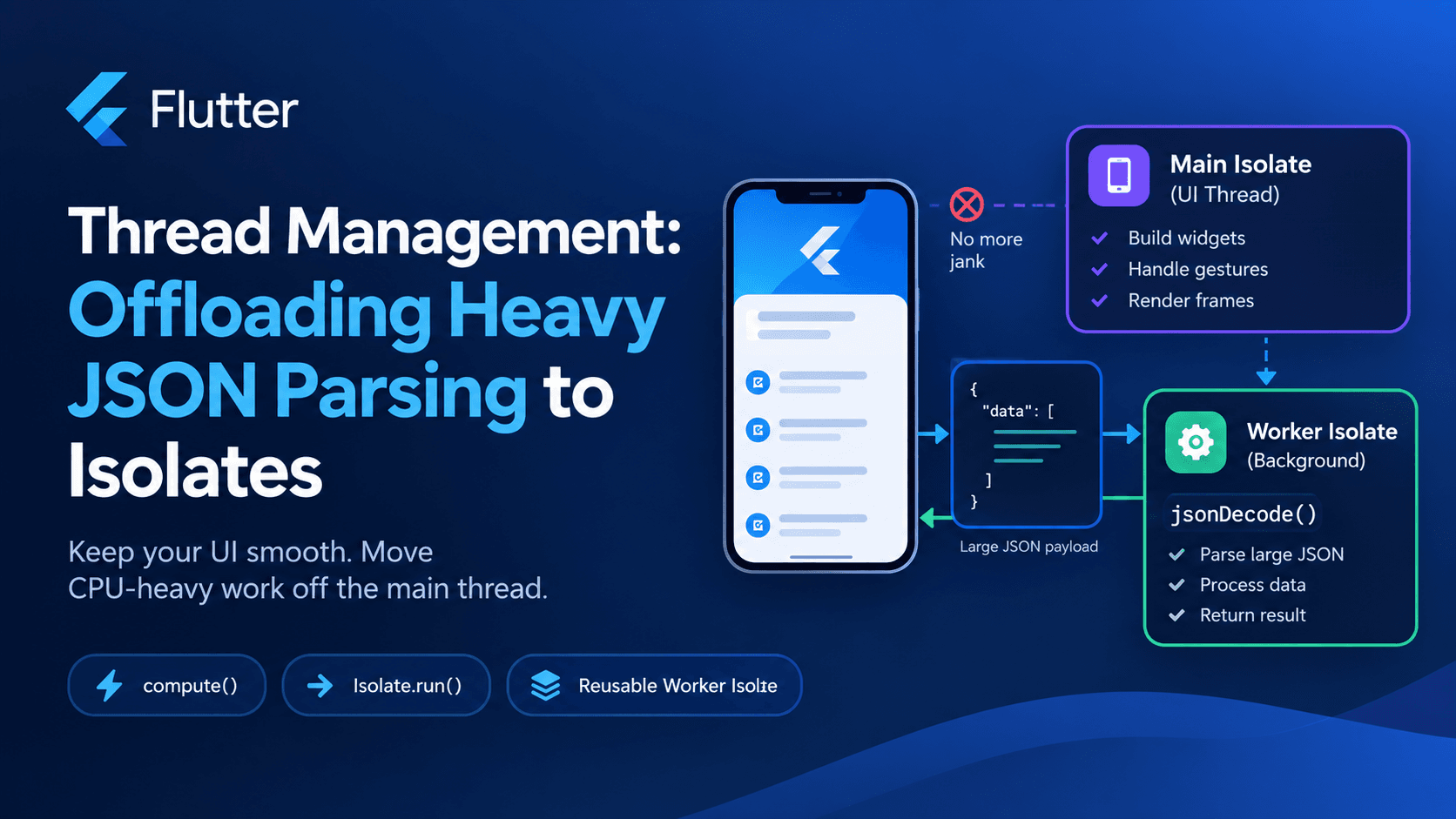
The catch is that by default, all Dart code in a Flutter app runs on a single isolate, called the main isolate. That's the same isolate that handles gesture input, runs your build() methods, and schedules frames. When you call jsonDecode() on a multi-megabyte API response, that call runs synchronously on the main isolate. Dart doesn't "pause" it politely between frames — it runs to completion, and every frame due during that window gets dropped. This is what Flutter's own performance documentation calls : stuttering caused by any single computation exceeding the frame gap.
await doesn't save you here. jsonDecode is a synchronous, CPU-bound function — wrapping it in a Future or an async function doesn't move the work anywhere; it just returns a Future that resolves once the (still main-thread) work is done.
Isolates Are Not Threads (and Why That Matters)
It's tempting to reach for familiar threading vocabulary here, but Dart's concurrency model is deliberately different. According to Dart's own concurrency documentation, isolates are independent workers, each with their own memory heap and their own event loop. Unlike OS threads in languages like Java or C++, isolates share nothing by default — no shared mutable state, no locks, no race conditions on shared objects.
Communication between isolates happens exclusively through message passing over SendPort/ReceivePort pairs. When you send an object to another isolate, Dart either copies it or transfers ownership of it, depending on the type — primitives, String, List, Map, and Uint8List (via TransferableTypedData) are supported; things like open Socket handles or closures that capture non-sendable state are not.
This matters for JSON parsing specifically: a decoded JSON string is just nested Map/List/primitive data, which makes it an ideal candidate for isolate messaging — no special serialization logic required.
Flutter's own guidance is direct about when to reach for isolates: only when a computation is large enough to cause UI jank. Common cases listed in the official docs include parsing and decoding large data files, reading from local databases, and processing images, audio, or video — JSON parsing sits squarely in that first category.
The Naive (Blocking) Approach
Here's the pattern that causes the jank in the first place:
Future<List<Product>> fetchProducts() async {
  final response = await http.get(Uri.parse('https://api.example.com/products'));

  // Runs on the main isolate — blocks frame rendering for large payloads
  final decoded = jsonDecode(response.body) as List<dynamic>;
  return decoded.map((json) => Product.fromJson(json)).toList();
}
For a small payload (a few KB), this is completely fine — spinning up an isolate has its own fixed overhead, and for trivial parsing that overhead can cost more than it saves. The problems start when payloads grow into the hundreds of KB or several MB range: large list endpoints, offline-sync payloads, bulk exports, or nested object graphs with deep fromJson chains.
Option 1: compute() — The Fast, Low-Effort Fix
Flutter's foundation library ships a helper called compute(), documented at api.flutter.dev/flutter/foundation/compute.html. It spawns a new isolate, runs your callback on it, sends back the result, and then shuts the isolate down — all in one call.
import 'package:flutter/foundation.dart';

// Must be a top-level function or static method
List<Product> _parseProducts(String responseBody) {
  final decoded = jsonDecode(responseBody) as List<dynamic>;
  return decoded.map((json) => Product.fromJson(json)).toList();
}

Future<List<Product>> fetchProducts() async {
  final response = await http.get(Uri.parse('https://api.example.com/products'));
  return compute(_parseProducts, response.body);
}
A few constraints worth internalizing from the official docs:
The callback passed to compute()must be a top-level function or a static method — instance methods and closures that capture local state aren't allowed, since the callback has to be sendable to another isolate.
Both the input message and the return value must themselves be sendable across isolates.
On native platforms, compute() is functionally equivalent to await Isolate.run(() => callback(message)).
compute() is the right first move for most apps: it's a single function call, it requires no manual port management, and it completely eliminates parsing jank for one-off heavy payloads.
Option 2: Isolate.run() — Same Idea, Inline Syntax
If you're targeting a Dart SDK that supports Isolate.run (introduced as the modern, ergonomic equivalent of compute), you can skip defining a separate top-level function for simple cases and use a closure directly, since Isolate.run handles the isolate lifecycle for you in a single call:
Future<List<Product>> fetchProducts() async {
  final response = await http.get(Uri.parse('https://api.example.com/products'));

  return Isolate.run(() {
    final decoded = jsonDecode(response.body) as List<dynamic>;
    return decoded.map((json) => Product.fromJson(json)).toList();
  });
}
Functionally, this behaves the same as compute() on native platforms — a new isolate is spawned, does the work, sends the result back, and is torn down. Pick whichever reads more naturally in your codebase; there's no meaningful performance difference between the two for a single parse operation.
The Hidden Cost of compute() / Isolate.run: Spawn Overhead
Both of the approaches above spawn a brand-new isolate every single call. Isolate creation isn't free — it involves allocating a new memory heap and initializing a new event loop. For a one-off parse (say, loading a product catalog once on app start), that cost is negligible next to the jank it prevents.
But if your app is repeatedly parsing JSON — a chat app decoding incoming messages every few seconds, a live dashboard polling an endpoint, a sync engine processing batches on a timer — spawning and killing an isolate on every call adds up, and you lose the benefit of isolate reuse.
For that pattern, you want a long-lived worker isolate.
Option 3: A Reusable Worker Isolate for Repeated Parsing
This pattern spawns one isolate up front, keeps it alive for the life of a feature (or the whole app), and sends it parse jobs through a persistent port — no repeated spawn cost.
import 'dart:async';
import 'dart:convert';
import 'dart:isolate';

class _ParseRequest {
  final int id;
  final String jsonBody;
  _ParseRequest(this.id, this.jsonBody);
}

class _ParseResponse {
  final int id;
  final Object? result;
  final Object? error;
  _ParseResponse(this.id, {this.result, this.error});
}

class JsonWorker {
  Isolate? _isolate;
  late SendPort _sendPort;
  final ReceivePort _receivePort = ReceivePort();
  final Map<int, Completer<Object?>> _pending = {};
  int _nextId = 0;

  Future<void> start() async {
    final portReady = Completer<SendPort>();

    _receivePort.listen((message) {
      if (message is SendPort) {
        portReady.complete(message);
      } else if (message is _ParseResponse) {
        final completer = _pending.remove(message.id);
        if (completer == null) return;
        if (message.error != null) {
          completer.completeError(message.error!);
        } else {
          completer.complete(message.result);
        }
      }
    });

    _isolate = await Isolate.spawn(_entryPoint, _receivePort.sendPort);
    _sendPort = await portReady.future;
  }

  Future<List<Product>> parseProducts(String jsonBody) async {
    final id = _nextId++;
    final completer = Completer<Object?>();
    _pending[id] = completer;
    _sendPort.send(_ParseRequest(id, jsonBody));
    final result = await completer.future;
    return result as List<Product>;
  }

  void dispose() {
    _isolate?.kill(priority: Isolate.immediate);
    _receivePort.close();
    _pending.clear();
  }

  static void _entryPoint(SendPort mainSendPort) {
    final workerReceivePort = ReceivePort();
    mainSendPort.send(workerReceivePort.sendPort);

    workerReceivePort.listen((message) {
      if (message is! _ParseRequest) return;
      try {
        final decoded = jsonDecode(message.jsonBody) as List<dynamic>;
        final products = decoded.map((json) => Product.fromJson(json)).toList();
        mainSendPort.send(_ParseResponse(message.id, result: products));
      } catch (e) {
        mainSendPort.send(_ParseResponse(message.id, error: e.toString()));
      }
    });
  }
}
Usage — typically instantiated once in a service layer or provider and reused for the lifetime of that scope:
final worker = JsonWorker();
await worker.start();

final products = await worker.parseProducts(response.body);

// later, when the feature/screen is torn down
worker.dispose();
Key details baked into this pattern:
Request IDs let a single worker isolate handle multiple concurrent parse requests without responses getting crossed.
Error propagation matters — an uncaught exception inside an isolate's entry point doesn't automatically surface as a Dart exception on the main isolate; wrapping the parse in try/catch and sending an explicit error message keeps failures visible.
Explicit disposal (Isolate.kill) is essential — a worker isolate you forget to kill keeps running and holding memory for the life of the app process.
Measuring Whether You Actually Have a Jank Problem
Before reorganizing your data layer around isolates, verify the problem actually exists. Flutter DevTools' Performance view shows a frame-by-frame timeline; frames rendered in red or exceeding the 16ms/8ms marker indicate jank, and the CPU profiler will show jsonDecode/fromJson calls as the culprit if that's genuinely where time is going. Optimizing isolate usage for a payload that parses in 2ms is wasted engineering effort — profile first, then offload.
Common Pitfalls
Passing non-top-level callbacks to compute(). Instance methods and closures capturing this won't compile or will throw at runtime, since the isolate boundary requires a function that can be sent independently of its enclosing context.
Sending unsendable objects.BuildContext, open file handles, and platform channel objects can't cross isolate boundaries. Keep isolate inputs and outputs to primitives, String, List, Map, and typed data.
Parsing fromJson models that reference Flutter widgets or BuildContext. Keep model classes framework-agnostic (pure Dart) so they're safe to construct inside a worker isolate.
Forgetting to dispose worker isolates, leaking memory over a long-running app session.
Reaching for isolates on small payloads. The fixed cost of spawning an isolate (roughly single-digit milliseconds) can exceed the cost of just parsing a small JSON body inline.
Quick Reference: Which Approach to Use
Scenario
Recommended approach
One-off large JSON parse (e.g., initial catalog load)
compute() or Isolate.run()
Small, infrequent payloads (a few KB)
Parse inline — no isolate needed
Frequent, repeated parsing (polling, live streams, sync jobs)
Long-lived worker isolate
Parsing tied to app lifecycle (background sync service)
Long-lived worker isolate, disposed with the service
Wrapping Up
Flutter's single-isolate-by-default model is a reasonable trade-off for most apps, but heavy jsonDecode calls are one of the most common — and most fixable — sources of UI jank. Start with compute() for one-off parsing, confirm the win with DevTools' frame timeline, and only move to a persistent worker isolate once you have a genuine recurring parsing workload that justifies keeping an isolate alive.
If you're validating the JSON structures you're parsing before wiring up fromJson models, TVerge's JSON Formatter & Validator is useful for catching malformed payloads early, and the JSON to TypeScript Converter can help you sanity-check field shapes when an API is shared across a Flutter client and a TypeScript backend or web app.