Overcoming the "Hydration Mismatch" Nightmare in Next.js App Router
If you've shipped anything real with the Next.js App Router, you've almost certainly met this message in your terminal or browser console:
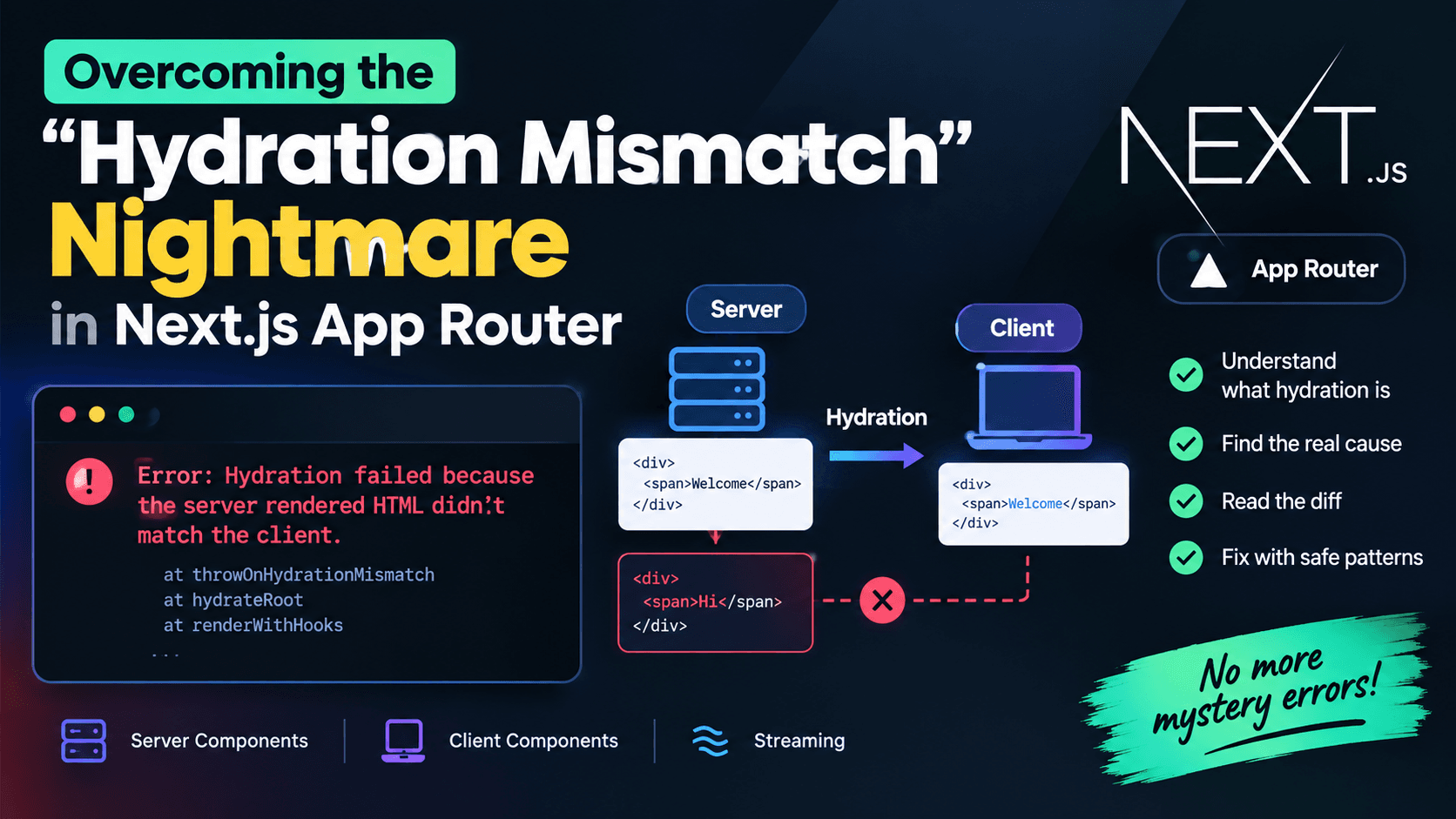
Error: Hydration failed because the server rendered HTML didn't match the client.
It's one of the most reported, most misunderstood errors in the entire React ecosystem — and the App Router's mix of Server Components, Client Components, and streaming makes it behave differently than it did in the old Pages Router. The warning is vague, the stack trace rarely points at the real culprit, and the fix that worked for your teammate's bug often does nothing for yours.
This guide breaks the problem down properly: what hydration actually is in the App Router's architecture, why mismatches happen, how to read the diff Next.js gives you, and the specific, production-safe patterns for eliminating each category of mismatch for good — not just silencing the warning.
What "Hydration" Actually Means in the App Router
In a Server Components architecture, rendering happens in two very different places, and it's important to be precise about which one "hydration" refers to.
- The server renders your component tree. Server Components execute on the server and produce a special React payload (not plain HTML) that describes the UI. Client Components inside that tree are also rendered to HTML on the server as part of the initial response, so the browser receives real, visible markup on first paint.
- The browser "hydrates" that HTML. React walks the DOM that was sent from the server and attaches event listeners, state, and effects to it — reusing the existing markup instead of throwing it away and re-rendering from scratch. This is the
hydrateRootstep described in the React documentation.
Hydration only happens for Client Components (anything marked with "use client" or nested inside one). Server Components render once, on the server, and never re-run in the browser — they have no client-side output to compare against, so they cannot themselves cause a hydration mismatch. When you see a hydration error in an App Router project, the real cause is always inside a Client Component subtree: something that Client Component rendered on the server differs from what it renders during the browser's first pass.
That distinction matters because it tells you where to look first. If a mismatch appears somewhere in your tree, you can usually trace it upward until you hit the nearest "use client" boundary — that's your search area, not the whole page.
Why the App Router Makes This Different From the Pages Router
A few App Router features change how mismatches show up and how painful they are to track down:
- Streaming SSR with Suspense. The App Router can send HTML in chunks as it becomes ready, rather than all at once. A mismatch inside a streamed,
Suspense-wrapped section is isolated to that boundary — React can recover locally instead of blowing up the whole page, but it also means the same bug can look different depending on which boundary it lands in. - Server/Client boundaries are explicit. Every
"use client"directive is a hydration boundary. More boundaries mean more places a mismatch can originate, but also more precision when you're isolating the bug. - Root layout owns
<html>and<body>. In the App Router,app/layout.tsxis responsible for the top-level<html>and<body>tags for the entire app, which is a common place for a very specific, well-documented mismatch to appear (covered below). - Server-only data access is closer to the render. Functions like
cookies()andheaders()let Server Components branch on request data. It's easy to accidentally let that branching leak into a Client Component's initial render in a way that differs from the client's own read of the same information (e.g., a cookie the browser sees slightly differently, or a locale computed differently on each side).
None of this changes the underlying rule from classic React SSR: whatever a Client Component renders on the server must be reproducible, byte-for-byte, on the client's first render pass. The App Router just changes where that rule gets tested.
Reading the Error: What Next.js Is Actually Telling You
Modern Next.js versions print a diff-style error showing the mismatched branch of the tree, and link out to the canonical explanation at nextjs.org/docs/messages/react-hydration-error. The important parts to read, in order:
- The component name in the stack trace — this is your entry point, not necessarily the root cause.
- The diff block — Next.js shows a
+/-style comparison of what the server rendered versus what the client attempted to render. A+line is what the client wanted to render; look at exactly what's different (a class name, a text node, an entire element). - The message text itself — "Text content does not match," "did not expect server HTML to contain," and "expected a DOM node type" each point to a different family of bug (text mismatch, extra/missing element, or wrong element type).
Resist the urge to guess-and-check with suppressHydrationWarning before you've actually read the diff. It's a two-minute read that saves an hour of blind edits.
The Six Most Common Causes
1. Browser-only APIs read during render
The classic cause. window, document, localStorage, navigator, and matchMedia don't exist on the server, so any component that reads them directly during render will produce different output in each environment.
"use client";

// Wrong: this runs during both server and client render passes.
// On the server, window is undefined; on the client it isn't.
function Banner() {
  const isWide = typeof window !== "undefined" && window.innerWidth > 1024;
  return <div>{isWide ? "Wide layout" : "Compact layout"}</div>;
}
Guarding with typeof window !== "undefined" stops the server from crashing, but it doesn't stop the mismatch — the server still renders the "Compact layout" branch while the client, which does have window, renders "Wide layout." That difference is exactly what triggers the warning.
2. Dates, times, and locale-dependent formatting
new Date(), Date.now(), and locale-aware formatting (toLocaleDateString, toLocaleTimeString) depend on the server's clock and locale settings, which frequently differ from the visitor's browser — different timezone, different Intl locale, or simply a few milliseconds' difference tipping a formatted string across a minute or day boundary.
"use client";

// Server (UTC) and client (visitor's local timezone) can format this differently.
function LastUpdated({ isoString }) {
  return <span>{new Date(isoString).toLocaleString()}</span>;
}
3. Random or non-deterministic values generated during render
Math.random(), crypto.randomUUID(), or any incrementing counter called directly in a component body will produce a different value on the server and on the client, because they're two separate executions.
"use client";

// A new, different id every render — one on the server, another on the client.
function Field() {
  const id = Math.random().toString(36);
  return <input id={id} />;
}
4. Browser extensions mutating the DOM before React hydrates
This one isn't a bug in your code at all. Extensions like Grammarly, password managers, and dark-mode injectors insert attributes (data-gr-ext-installed, data-new-gr-c-s-check-loaded) or wrap elements directly in the rendered <body> before React has a chance to hydrate it. React then sees attributes it never rendered and reports a mismatch on <body>.
5. Invalid HTML nesting
The browser's HTML parser silently repairs invalid nesting — for example, moving a <div> out of a <p>, because <p> cannot contain block-level elements. React doesn't know the browser did this, so it compares its own (uncorrected) expected tree to the browser's corrected DOM and reports a mismatch.
// Invalid: <div> is not allowed inside <p>, so the browser auto-closes the <p> early.
function Summary() {
  return (
    <p>
      Summary text
      <div className="badge">New</div>
    </p>
  );
}
6. Conditional rendering based on user-agent sniffing or feature detection
Rendering different markup based on navigator.userAgent, device detection libraries, or feature checks (e.g., "does this browser support X") almost always mismatches, because that information either isn't available to the server at all or is derived differently there (for example, from request headers) than it is in the browser.
A Reliable Debugging Workflow
Before reaching for a fix, narrow the problem down methodically:
- Reproduce with all browser extensions disabled, ideally in an incognito/private window. This immediately rules out (or confirms) cause #4.
- Read the diff in the error overlay and identify the exact element or text node that differs.
- Find the nearest
"use client"boundary above the flagged component — that's your actual search radius, not the whole page. - Search that subtree for the six patterns above —
window,document,localStorage,Date,Math.random,typeof window, and any raw<p>/<div>nesting. - Temporarily comment out suspect sections and re-render to confirm which one is responsible before writing the fix — this avoids "fixing" the wrong thing and shipping a
suppressHydrationWarningthat just hides a different bug later.
Fixing It: Pattern by Pattern
Pattern A — The "mounted" flag with useEffect
The most common and most portable fix. Render a value that's identical on both server and client for the first paint, then swap it out for the real, browser-only value after mount:
"use client";

import { useState, useEffect } from "react";

function ViewportBadge() {
  const [isWide, setIsWide] = useState(false); // identical on server and first client render

  useEffect(() => {
    setIsWide(window.innerWidth > 1024);
  }, []);

  return <div>{isWide ? "Wide layout" : "Compact layout"}</div>;
}
Because useEffect never runs on the server and doesn't run until after hydration completes on the client, both environments render the same "Compact layout" state on the first pass. The correct value appears in a second, client-only render, which is invisible to the hydration check.
Pattern B — useSyncExternalStore for anything that reads live browser state
For values that come from an external, subscribable source — window size, online/offline status, matchMedia, localStorage — useSyncExternalStore is the pattern React's own team recommends over ad hoc useEffect flags, because it has a dedicated, built-in slot for the server's snapshot. See the React reference for useSyncExternalStore.
"use client";

import { useSyncExternalStore } from "react";

function subscribe(callback) {
  window.addEventListener("resize", callback);
  return () => window.removeEventListener("resize", callback);
}

function getSnapshot() {
  return window.innerWidth > 1024;
}

function getServerSnapshot() {
  // Explicit, deterministic value used only during SSR and hydration.
  return false;
}

function ViewportBadge() {
  const isWide = useSyncExternalStore(subscribe, getSnapshot, getServerSnapshot);
  return <div>{isWide ? "Wide layout" : "Compact layout"}</div>;
}
This removes the extra render flicker you sometimes get with the useEffect flag pattern, and keeps the "what does the server render" decision explicit and in one place.
Pattern C — next/dynamic with ssr: false for genuinely client-only widgets
Some components — a charting library that reads canvas dimensions, a map that needs window, a rich-text editor bound to document — have no meaningful server-rendered state at all. Rather than fighting them into an SSR-safe shape, skip server rendering for that component entirely:
"use client";

import dynamic from "next/dynamic";

const HeavyChart = dynamic(() => import("./HeavyChart"), {
  ssr: false,
  loading: () => <div className="chart-placeholder" />,
});

export default function Dashboard() {
  return <HeavyChart />;
}
ssr: false can only be used inside a Client Component in the App Router, since Server Components have no client-side runtime to opt out of. It's covered in the Next.js lazy loading documentation.
Pattern D — suppressHydrationWarning, used narrowly
For values that are genuinely and unavoidably different between server and client — a live clock, a randomly generated ad-slot ID from a third party, a timestamp formatted in the visitor's timezone where the difference is expected and harmless — React provides an explicit escape hatch documented in the hydrateRoot reference.
"use client";

function LastUpdated({ isoString }) {
  return (
    <span suppressHydrationWarning>
      {new Date(isoString).toLocaleString()}
    </span>
  );
}
Two rules keep this from becoming a bad habit: apply it only to the single element with the unavoidable difference (never wrap a whole section in it), and only use it when you've confirmed the mismatch is expected and cosmetic — not as a first response to an error you haven't diagnosed yet.
This is also the documented fix for browser-extension noise on the root <body> tag:
// app/layout.tsx
export default function RootLayout({ children }) {
  return (
    <html lang="en">
      <body suppressHydrationWarning>{children}</body>
    </html>
  );
}
Pattern E — useId instead of Math.random() for generated identifiers
React's useId hook produces a stable identifier that's guaranteed to match between the server-rendered HTML and the client's hydration pass, specifically to solve this class of bug. See the React useId reference.
"use client";

import { useId } from "react";

function Field({ label }) {
  const id = useId();
  return (
    <>
      <label htmlFor={id}>{label}</label>
      <input id={id} />
    </>
  );
}
Pattern F — Fixing invalid HTML nesting
The fix is structural, not a React API: keep block-level elements out of inline-only containers. Swap the wrapping element or restructure the markup so it's valid before the browser ever has to "correct" it.
// Fixed: use a <div> wrapper instead of <p>, since the badge is block-level.
function Summary() {
  return (
    <div>
      Summary text
      <div className="badge">New</div>
    </div>
  );
}
App Router-Specific Gotchas Worth Knowing
- Third-party scripts belong in
next/script, not raw<script>tags. Using thenext/scriptcomponent with an appropriatestrategy(afterInteractive,lazyOnload) prevents third-party code from mutating the DOM mid-hydration the way a manually injected script tag can. - Don't branch Client Component output on server-only request data. If a Client Component needs something derived from
cookies()orheaders(), pass it down as a prop from a Server Component parent rather than trying to re-derive an equivalent value inside the Client Component from browser APIs — the two calculations can easily diverge. - Suspense boundaries contain the blast radius, not the cause. Wrapping a flaky section in
<Suspense>will stop one mismatch from tearing down the whole page during streaming, but the underlying non-determinism inside that boundary still needs to be fixed with one of the patterns above. - Server Components themselves are exempt, not immune. A Server Component can still cause problems indirectly — for example, if it computes a locale-formatted string and passes it as a prop into a Client Component that then re-formats it differently on the client. The mismatch shows up in the Client Component, but the root cause is the inconsistent formatting logic shared (or not shared) between the two.
Prevention Checklist
Treat this as a quick pre-merge pass on any Client Component that touches dates, randomness, or browser APIs:
- No direct reads of
window,document,localStorage, ornavigatorin the component body — move them intouseEffectoruseSyncExternalStore. - No
Math.random(),crypto.randomUUID(), or module-level counters used to produce rendered output — useuseIdfor identifiers. - Date and time formatting either happens identically on both sides (fixed timezone, fixed locale) or is wrapped in
suppressHydrationWarningon the specific element, deliberately. - Genuinely client-only components are loaded with
next/dynamicandssr: falserather than forced through SSR. - No block-level elements nested inside inline-only tags like
<p>,<span>, or<a>. - Third-party scripts load through
next/script, not manual<script>insertion. - The root
<body>inapp/layout.tsxcarriessuppressHydrationWarningif the app is known to be affected by DOM-mutating browser extensions in its target audience.
Conclusion
Hydration mismatches in the App Router are almost never mysterious once you know where to look: the bug always lives inside a Client Component, and it's always some form of "the server couldn't have known what I know now" — a browser API, a clock, a random number, or a DOM mutation that happened before React got there. Read the diff Next.js gives you, trace it to the nearest "use client" boundary, match it against the six causes above, and reach for the specific pattern that fits — useSyncExternalStore for live browser state, next/dynamic for client-only widgets, useId for generated identifiers, and suppressHydrationWarning only as a deliberate, narrow exception rather than a first response. Once the pattern-matching becomes automatic, the "nightmare" version of this error stops being a nightmare at all.
Further Reading (Official Documentation)
- Next.js — Hydration Failed Error Reference
- Next.js — Lazy Loading with
next/dynamic - React —
hydrateRootAPI Reference - React —
useSyncExternalStoreReference - React —
useIdReference
Related reading on TVerge Tech: browse more Next.js architecture and rendering breakdowns in the TVerge Tech blog archive, including our comparison of FastAPI and Next.js Server Actions for AI backends.