We use cookies for analytics and advertising. Ads are disabled until you accept advertising cookies. Read our Cookie Policy and Privacy Policy.
Concurrent Rendering Deep Dive: useTransition and useDeferredValue Explained | TVerge Tech
Concurrent Rendering Deep Dive: useTransition and useDeferredValue Explained
How React's useTransition and useDeferredValue manage CPU-intensive updates under the hood — a deep dive into concurrent rendering, interruptible renders, and scheduling priority.
Concurrent Rendering Deep Dive: How useTransition and useDeferredValue Manage CPU-Intensive Updates Under the Hood
Every React developer has hit the same wall at some point: a search box that types like it's underwater, a filter panel that freezes for half a second after every keystroke, a tab switch that stutters because the new panel renders 10,000 rows before the browser gets a chance to paint. The instinctive fix is usually useMemo, debouncing, or throwing the heavy computation onto a web worker. Those all help — but React 18 introduced a different answer to the same problem: concurrent rendering, exposed through two hooks that look deceptively simple, useTransition and useDeferredValue.
Understanding what these hooks actually do under the hood — not just how to call them — is what separates developers who use them correctly from developers who sprinkle them in and wonder why nothing changed. This deep dive walks through the scheduling model that makes concurrent rendering possible, how each hook taps into it differently, and where the two commonly get misapplied.
The Problem: Synchronous Rendering Has No Concept of Priority
Before React 18, every render was synchronous and uninterruptible. Once React started reconciling a component tree, it ran to completion — walking the fiber tree, computing new work, and committing DOM mutations — before yielding control back to the browser. If that tree was large or the computation inside it was expensive, the main thread stayed blocked for the entire duration. The browser couldn't paint, couldn't respond to a keypress, couldn't do anything until React finished.
This is fine for small updates. It becomes a real problem when a single state update — like typing a character into a search field that filters a large list — triggers a render that takes 200ms or more to complete. From the user's perspective, the keyboard just stopped working.
The core issue isn't that the computation is slow. It's that React had no way to distinguish an urgent update (the character appearing in the input) from a less urgent one (the filtered list re-rendering). Both were treated as equally important, equally synchronous, equally blocking.
What Concurrent Rendering Actually Changes
React 18's concurrent renderer introduces the ability for React to prepare more than one version of the UI at the same time, and — critically — to interrupt a render that's in progress if something more urgent comes in. This is the mechanism that makes useTransition and useDeferredValue possible; both hooks are just ergonomic entry points into this scheduling behavior, not separate features bolted on top of it.
A few properties of concurrent rendering matter for understanding what these hooks actually do:
Rendering is interruptible. React can start rendering a component tree, pause partway through, handle a more urgent update, and then either resume or discard the paused work entirely.
Rendering doesn't mean committing. React can compute a new version of the UI in the background without showing it to the user yet, then commit it to the DOM only when it's ready — or throw it away if a newer update supersedes it.
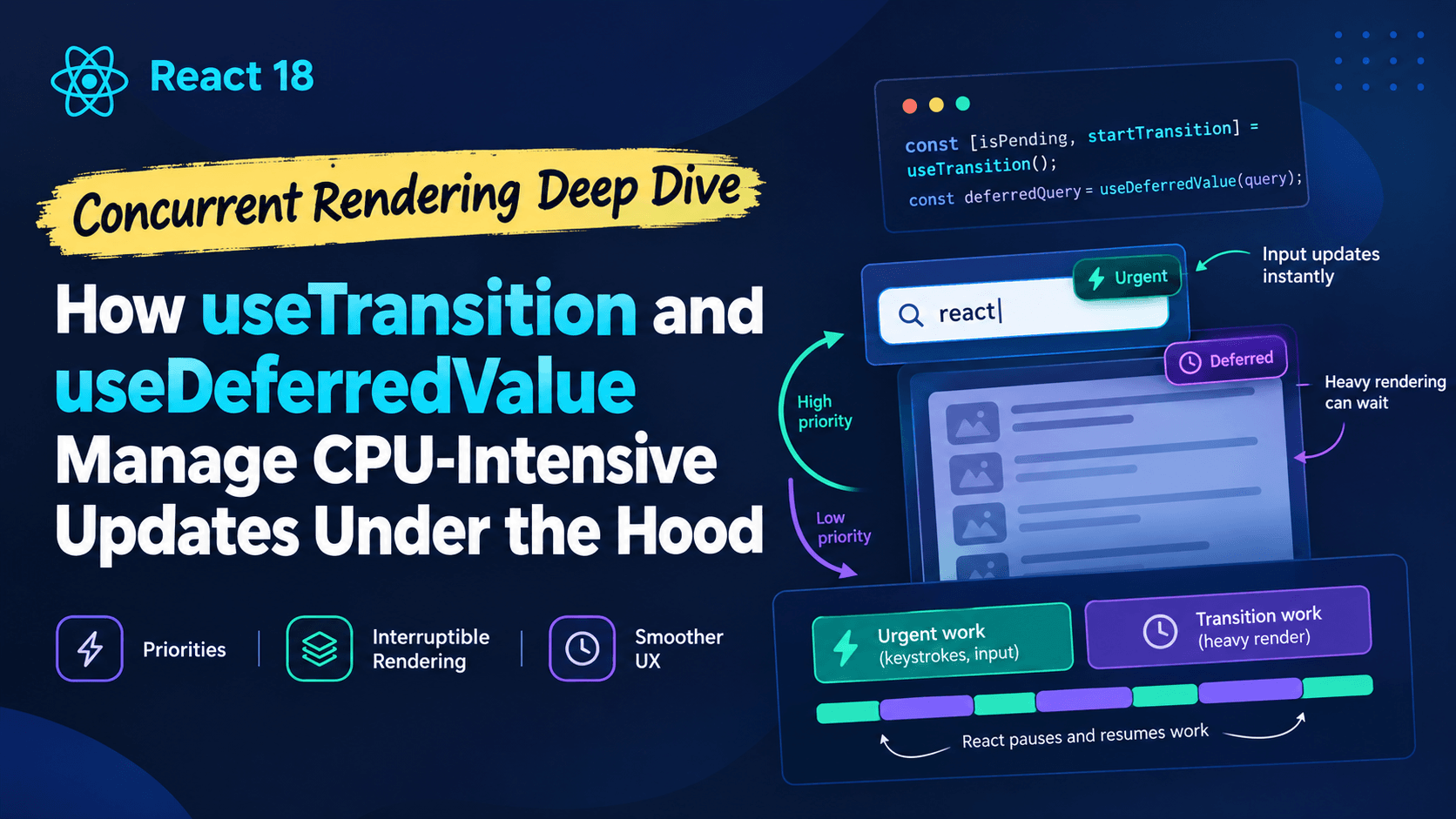
Priority is now a first-class concept. Every state update carries an implicit priority. Updates from direct user input (typing, clicking) are treated as urgent by default. Updates explicitly marked as Transitions are treated as interruptible and non-blocking.
This priority model is what both hooks are built on. Neither hook makes your code run faster. They change when and how React chooses to apply the resulting state update — which is a fundamentally different lever than optimizing the computation itself.
Inside useTransition: Marking Updates as Interruptible
setQuery(value) runs outside the transition, so it's scheduled as a normal, high-priority update. React commits this immediately — the input's displayed value updates without delay.
setFilteredItems(...) runs insidestartTransition, so React tags the resulting render with Transition priority instead of default priority.
React begins rendering the new state for filteredItems in the background. Because it's a Transition, this render is interruptible.
If the user types another character before the Transition render finishes, React abandons the in-progress background render entirely and starts a new one reflecting the latest input. The stale work is discarded, not queued.
isPending flips to true for the duration of the Transition, giving you a hook into showing a pending indicator without introducing a jarring full-screen loading state.
The key architectural detail is that abandonment, not throttling. React isn't slowing down the expensive render — it's making it disposable. If the CPU-intensive work becomes outdated before it finishes, React never wastes time finishing it. This is fundamentally different from debouncing, which delays starting work; Transitions let work start immediately but make it safe to interrupt mid-flight.
One caveat directly from the docs worth internalizing: the function passed to startTransition must run synchronously. Any set calls made after an await inside that function need to be wrapped in their own startTransition call, or React won't classify them as part of the Transition — a subtlety that trips up a lot of developers combining Transitions with async data fetching.
Inside useDeferredValue: Deferring a Value, Not an Action
useTransition requires you to have access to the state setter you want to deprioritize. Sometimes you don't — the expensive value might come from a prop, a parent component's state, or a third-party hook you don't control. That's exactly the gap useDeferredValue fills.
On the initial render, useDeferredValue returns the value you passed in (or an optional initialValue, if provided) — there's no previous version to fall back to yet.
When the input value changes, React first re-renders the component with the old deferred value, keeping the UI stable and responsive. Then, in the background, it schedules a second, interruptible render using the new value.
If the value changes again before that background render finishes, React discards it and restarts with the newest value — the same discard-and-restart behavior seen in Transitions.
This produces a visible "lag" effect: the expensive part of the UI trails slightly behind the fast-updating part, then catches up once the background render completes. That lag is the entire point — it's what keeps the input itself perfectly responsive while the heavy computation happens off the critical path.
The docs are explicit about a subtle gotcha here too: values passed to useDeferredValue should be primitives or objects created outside of render. Passing a freshly created object literal on every render defeats the purpose, since React compares the value with Object.is to decide whether a new background render is needed — a new object reference every time means every render looks "changed," and the deferred value never gets a chance to lag behind productively.
useTransition vs. useDeferredValue: Choosing the Right Tool
Both hooks solve the same underlying problem — keeping CPU-intensive updates from blocking urgent ones — but they operate at different points in the data flow:
useTransition
useDeferredValue
What it wraps
An action (a function that calls state setters)
A value
Requires access to
The set function for the state being updated
Nothing — works on any value, including props
Gives you a pending flag
Yes, isPending
No — you infer staleness by comparing the deferred value to the live one
Typical use case
You own the state update and want to mark it explicitly
The expensive re-render is driven by a value you receive, not one you set
A practical rule of thumb from the React team's own guidance: if you have the set function, reach for useTransition first, since it gives you an explicit pending state to drive loading indicators. Reach for useDeferredValue when you're consuming a value you don't control the origin of — a prop passed down, a value from a custom hook, or a piece of external state.
It's also worth noting a caveat in the docs that resolves a common point of confusion: if an update is already happening inside a Transition, useDeferredValue won't spawn an additional deferred render — it just returns the new value immediately, since the surrounding Transition has already made the update interruptible.
Why This Matters More Than It Looks Like It Should
The value of understanding the underlying scheduling model — rather than treating these hooks as syntax to memorize — becomes obvious the first time a Transition doesn't behave the way you expect. A few real failure patterns:
Wrapping a state update in startTransition does nothing if the update was already going to be fast. Transitions only matter when there's actually expensive rendering work downstream that benefits from being interruptible. On a cheap update, you'll see no observable difference.
Marking the wrong update as a Transition creates a laggy UI. If you wrap the input's own setQuery call in a Transition instead of the expensive filtered list, typing itself becomes sluggish — you've deprioritized the one update that needed to stay urgent.
useDeferredValue won't help if the expensive work isn't actually tied to the deferred value's identity. If the heavy computation depends on something else changing, deferring the wrong value accomplishes nothing.
These aren't edge cases — they're the direct, predictable consequence of how the scheduler prioritizes and discards work. Once you internalize that Transitions are about interruptibility and disposability of in-flight renders, rather than raw speed, these mistakes become easy to spot before they ship.
This kind of internals-first thinking is broadly useful across frontend performance work, not just this specific API pair. The same instinct — understanding what the runtime is actually doing before reaching for an API — shows up in analyses like what the 2026 App Router vs Pages Router performance benchmarks actually measure, where streaming and time-to-first-byte numbers only make sense once you understand what's happening beneath the abstraction. It's the same discipline that matters when reasoning about how closures and the scope chain quietly affect memory behavior in long-running JavaScript — the mental model of the runtime, not just the API surface, is what prevents subtle bugs.
Practical Guidelines for Production Use
A few patterns worth adopting when integrating these hooks into a real codebase:
Reserve Transitions for genuinely expensive re-renders. Filtering thousands of rows, re-rendering a large chart, recalculating a complex derived view — these are good candidates. Wrapping trivial updates adds indirection with no benefit.
Always pair isPending with a subtle UI cue, not a blocking spinner. The entire point of a Transition is to avoid jarring loading states. A small opacity change or an inline indicator preserves the responsive feel; a full-screen spinner defeats the purpose.
Keep the urgent state update outside the Transition. The value the user directly perceives as their own input — text in a box, a toggle's visual state — should update synchronously and immediately, with only the expensive downstream consequence deferred.
Memoize the expensive computation itself.useTransition and useDeferredValue control when a render happens, not how expensive it is. Combine them with useMemo (or the React Compiler's automatic memoization) so the deferred render itself is as cheap as possible when it finally runs.
Test on throttled CPUs. The benefits of concurrent rendering are most visible on slower devices. A fast development machine can mask exactly the kind of jank these hooks are designed to prevent.
Conclusion
useTransition and useDeferredValue aren't performance shortcuts — they're a UI-level exposure of React's concurrent scheduler, which can interrupt, discard, and restart in-progress rendering work based on priority. useTransition marks an action's resulting updates as interruptible and gives you an explicit pending flag; useDeferredValue achieves a similar effect for a value you don't control the setter of, trading a brief visual lag for a UI that never blocks on expensive work. Neither hook makes a slow computation fast. What they do is make sure that computation never gets in the way of the interactions users actually notice — and that distinction is exactly why they matter more than most micro-optimizations aimed at the computation itself.
Frequently Asked Questions
Does useTransition make my component render faster?
No. It doesn't reduce the cost of the render — it changes when and how that render is scheduled, allowing React to interrupt it if something more urgent arrives. The perceived responsiveness improves because urgent updates never wait behind non-urgent ones.
Can I use useDeferredValue and useTransition together?
Yes, and it's common in practice — for example, wrapping a state setter in startTransition at the point of update, while a component further down the tree uses useDeferredValue on a prop it receives. As noted in the React docs, if a value change already occurred inside a Transition, useDeferredValue simply returns the new value immediately rather than scheduling a redundant deferred render.
Do these hooks work without concurrent rendering enabled?
They require React 18 or later and are only meaningful when used within an app rendered via createRoot, since concurrent features are opt-in and depend on the concurrent renderer being active.
3Demystifying the Rust Borrow Checker: Fix Lifetime Errors Fast