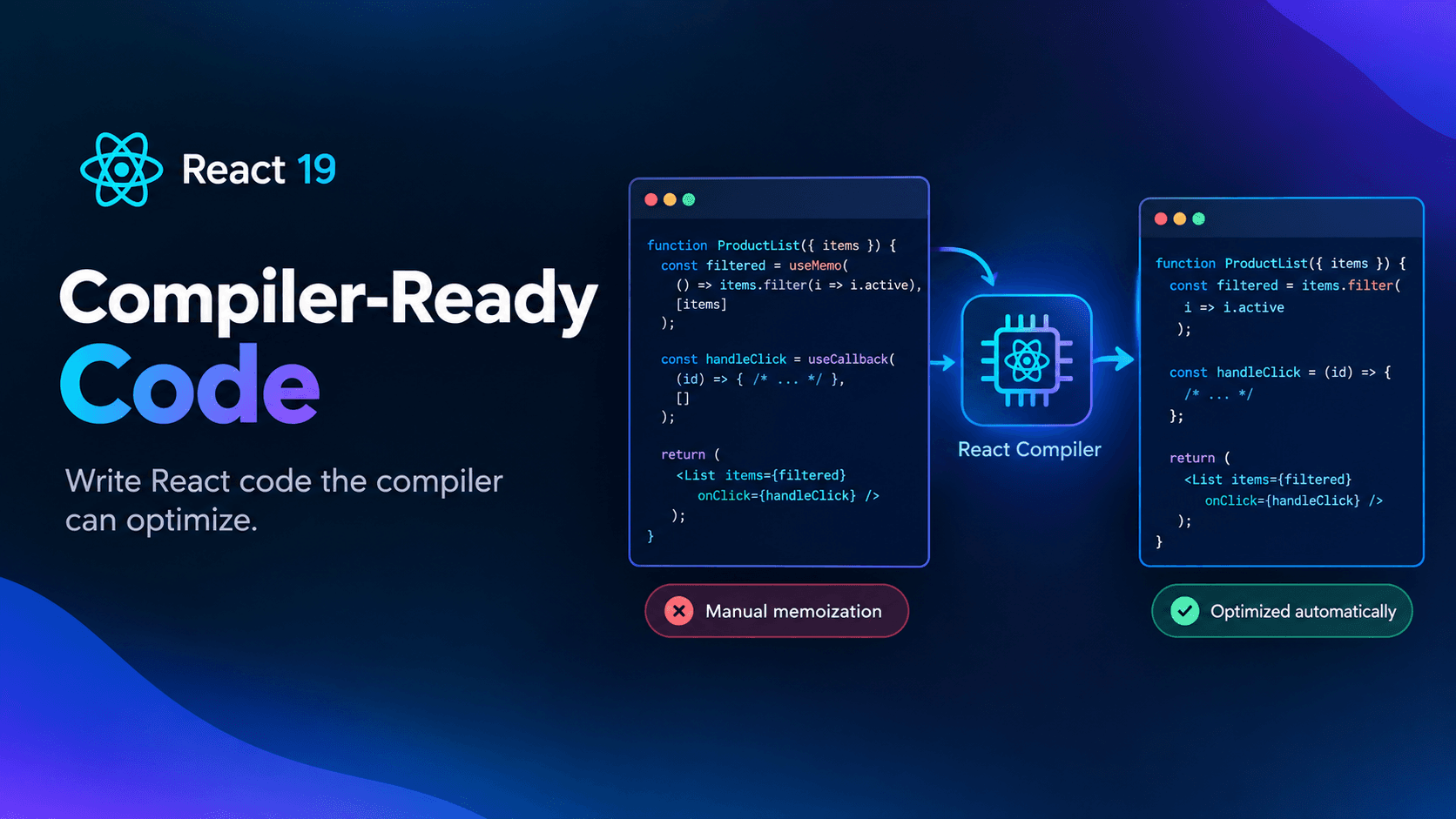
Compiler-Ready Code: How to Write Code Optimized for the React Compiler (React 19)
If you've spent any time in a React codebase built before 2024, you've probably seen this pattern everywhere: useMemo wrapping a calculation "just in case," useCallback wrapping every function passed as a prop, and React.memo sprinkled on components that never needed it. This defensive style of coding grew out of a real problem — uncontrolled re-renders — but it came with a real cost: more code to write, more dependency arrays to get wrong, and more bugs hiding behind memoization that silently breaks.
The React Compiler changes that equation. Instead of asking developers to manually reason about referential equality on every render, the compiler analyzes your component tree at build time and inserts the memoization for you. But "the compiler will handle it" doesn't mean you can write React however you want. The compiler is only as effective as the code it's given, and it strictly requires your code to follow the Rules of React. Feed it code that violates those rules, and it will either bail out of optimizing that component or — worse — produce a build that behaves inconsistently.
This guide walks through what "compiler-ready" code actually looks like, what the compiler does and doesn't do for you, and why chasing manual optimization on top of the compiler is usually wasted effort.
What the React Compiler Actually Does
According to the official React Compiler documentation, the compiler is a build-time tool that automatically memoizes your components and values, effectively replicating what useMemo, useCallback, and React.memo used to do by hand. It works directly on plain JavaScript and JSX — no new syntax, no special hooks to learn.
Two specific problems it solves:
- Cascading re-renders. When a parent component's state changes, React re-renders that component and all of its children by default, even if a child's actual output hasn't changed. The compiler determines which parts of the returned JSX can be safely reused and skips re-rendering components whose relevant props haven't changed.
- Repeated expensive calculations. If a function call inside a component does non-trivial work — sorting a large array, transforming a dataset — the compiler can memoize that call so it doesn't re-run on every render if its inputs haven't changed.
Importantly, the compiler only memoizes components and hooks, not arbitrary functions. A helper function like expensivelyProcessAReallyLargeArrayOfObjects() only gets memoized if it's called from inside a component or hook — the function itself isn't wrapped everywhere it's used, and the memoization isn't shared across unrelated components that happen to call it with the same arguments. If a calculation is genuinely expensive and reused broadly, it may still deserve its own caching strategy outside of React.
The Real Prerequisite: Your Code Must Follow the Rules of React
This is the part of "compiler-ready code" that gets skipped over the most, and it's the one that actually matters. The compiler isn't magic — it's a static analysis tool. It reads your source, builds a model of how your data flows, and decides what's safe to skip re-computing. That model only holds up if your code respects the assumptions React already makes about how components behave.
The Rules of React boil down to three areas:
1. Components and Hooks Must Be Pure
- Idempotency — given the same props, state, and context, a component should always produce the same output. If your component's render logic depends on
Math.random(), the current timestamp, or a mutable module-level variable, its output isn't predictable, and the compiler can't safely skip re-running it. - No side effects during render — network calls, DOM mutation, logging with side effects, or writing to external state should never happen directly in the body of a component. Side effects belong in event handlers or
useEffect. - Immutable props and state — never mutate a prop or a piece of state directly. Treat every render's props and state as a frozen snapshot.
- Immutable hook arguments and return values — once you pass a value into a hook, or a hook returns a value to you, don't mutate it afterward.
- Immutability after being passed to JSX — once a value has been used in JSX output, don't mutate it later in the same render.
Every one of these rules exists because the compiler (and React itself) needs to reason about whether a value has "changed" between renders. Mutation defeats that reasoning entirely — if you mutate an object in place, its reference stays the same even though its contents changed, which is exactly the kind of inconsistency that produces stale UI or, worse, UI that appears to work in development but breaks after compilation.
2. React Calls Components and Hooks — You Don't
Never invoke a component as a plain function (MyComponent(props)) outside of JSX, and never pass a hook around as if it were a regular value to be called conditionally later. React needs to own the calling of components and hooks so it can track render order, state, and context correctly.
3. Rules of Hooks
- Only call hooks at the top level of a component or custom hook — never inside loops, conditionals, or nested functions.
- Only call hooks from component functions or other hooks, never from plain utility functions.
If you're already running eslint-plugin-react-hooks, most of this is enforced for you. The React Compiler also ships its own ESLint rule that flags code the compiler can't safely optimize — when that rule fires, the compiler simply skips optimizing that specific component or hook rather than failing the build, so you can adopt it gradually rather than fixing every violation on day one.
Writing Components the Compiler Can Actually Optimize
With the ground rules in place, here's what compiler-friendly code looks like in practice.
Stop Wrapping Everything in useMemo and useCallback
The example on React's own documentation is a good illustration of the old pattern:
jsx
import { useMemo, useCallback, memo } from 'react';

const ExpensiveComponent = memo(function ExpensiveComponent({ data, onClick }) {
  const processedData = useMemo(() => {
    return expensiveProcessing(data);
  }, [data]);

  const handleClick = useCallback((item) => {
    onClick(item.id);
  }, [onClick]);

  return (
    <div>
      {processedData.map(item => (
        <Item key={item.id} onClick={() => handleClick(item)} />
      ))}
    </div>
  );
});
This looks careful, but it actually contains a subtle bug: the inline arrow function () => handleClick(item) is re-created on every render regardless of the useCallback wrapper, which means Item receives a new onClick prop every time and the memoization never pays off.
With the compiler enabled, you write the same logic without any of the manual wiring:
jsx
function ExpensiveComponent({ data, onClick }) {
  const processedData = expensiveProcessing(data);

  const handleClick = (item) => {
    onClick(item.id);
  };

  return (
    <div>
      {processedData.map(item => (
        <Item key={item.id} onClick={() => handleClick(item)} />
      ))}
    </div>
  );
}
The compiler analyzes the data flow and inserts the equivalent memoization automatically — correctly, including around the inline arrow function that broke the manual version. This is the core shift compiler-ready code asks of you: write the plain, readable version first, and let the build step add the optimization.
Keep useMemo and useCallback as an Escape Hatch, Not a Default
The compiler doesn't ban useMemo and useCallback — it just makes them optional in the common case. There's still a legitimate reason to reach for them manually: when a memoized value is used as a dependency in useEffect and you need to guarantee referential stability so the effect doesn't fire more often than intended. In that case, explicit memoization gives you precise control the compiler's heuristics can't infer from context.
For existing codebases, the official guidance is worth repeating exactly: don't strip out existing useMemo/useCallback calls just because the compiler is now enabled. Removing them can change what the compiler decides to memoize, so either leave them in place or remove them carefully with testing, not as a blanket cleanup pass.
Don't Reach for React.memo by Default
React.memo exists to stop a component from re-rendering when its props haven't meaningfully changed. Under the compiler, this is handled automatically as part of its analysis of cascading re-renders — you generally don't need to wrap components in memo unless you have a specific, measured reason to.
Treat Expensive Non-React Work Separately
If you have a function that does real, measurable heavy lifting — parsing a large payload, running a complex calculation — and it's called from multiple components, remember that the compiler's memoization is scoped to a single component or hook. It won't deduplicate that work across separate call sites. Before reaching for a custom caching layer, actually profile it. React's own documentation on useMemo includes guidance on how to tell if a calculation is genuinely expensive before you add complexity to work around it.
Avoiding Premature Optimization Under the Compiler
The existence of automatic memoization removes the need for one category of premature optimization, but it opens the door to a new one: over-engineering around the compiler itself. Here's what to watch for.
Don't Pre-Optimize State Shape "for the Compiler"
Some teams start restructuring their state — flattening objects, splitting contexts prematurely, avoiding object literals in render — specifically because they assume the compiler needs help. In most cases it doesn't. The compiler is designed to work with plain, idiomatic React and JavaScript. Reshaping your data model around a guess about compiler internals usually adds complexity without a measured benefit, and it can make the actual bug (if there is one) harder to find later.
Don't Assume Every Slow Render Is a Memoization Problem
Not every performance issue is a re-render problem. Slow renders can come from unbatched state updates, oversized third-party bundles, unoptimized images, expensive CSS, or network waterfalls. Before reaching for any optimization — compiler-assisted or manual — profile with React DevTools or your browser's performance panel and confirm that re-rendering is actually the bottleneck. The compiler's badge system helps here: components it has successfully optimized show a "Memo ✨" badge in React DevTools, so you can see directly whether a given component is already being handled rather than guessing.
Don't Fight the Compiler's Bail-Outs Manually
When the compiler's ESLint rule flags a component it can't safely optimize, the instinct is sometimes to immediately hand-roll useMemo/useCallback around it as a workaround. Often the better fix is to address the underlying Rules of React violation — an impure calculation, a mutated prop, a hook called conditionally — because that violation is very likely also a latent bug, independent of whether the compiler can optimize around it. Fixing the root cause benefits both the compiler and the correctness of your app; papering over it with manual memoization only benefits the compiler's output, and only sometimes.
Adopt Incrementally Rather Than Rewriting Everything at Once
The compiler supports incremental adoption — you don't have to enable it across an entire codebase on day one, and you don't need to "fix" every ESLint violation before shipping. Trying to force full compiler coverage immediately, especially on a large legacy codebase, is itself a form of premature optimization: it front-loads risk and engineering time against a benefit that can be captured gradually and safely instead.
A Practical Checklist for Compiler-Ready Code
- Write components as pure functions of props, state, and context — no reliance on
Math.random(), timestamps, or external mutable state during render. - Keep side effects (data fetching, subscriptions, logging with side effects, DOM manipulation) inside
useEffector event handlers, never in the render body. - Never mutate props, state, hook arguments, hook return values, or anything already passed to JSX.
- Call all hooks unconditionally at the top level of components or custom hooks.
- Only call components through JSX — never invoke them as plain functions.
- Remove
useMemo,useCallback, andReact.memofrom new code by default; add them back only when you need precise control (for example, stabilizing an effect dependency). - Leave existing manual memoization in legacy code alone unless you're prepared to test the change carefully.
- Enable
eslint-plugin-react-compilerand treat its warnings as signals about Rules-of-React violations, not just compiler blockers. - Profile before optimizing — use React DevTools to check for the "Memo ✨" badge and confirm re-renders are actually the bottleneck before adding any extra layer of caching.
- Adopt the compiler incrementally in existing projects rather than requiring full coverage before shipping.
Getting Started
The installation guide covers setup across Babel, Vite, Metro, and Rsbuild, and Next.js 15.3.1+ can enable the compiler through its SWC integration without adding Babel back into the pipeline. If you hit unexpected behavior after enabling it, React's debugging and troubleshooting guide walks through how to distinguish a compiler error from an underlying runtime bug, along with common breaking patterns to check first.
Related Reading
If you're working through re-render performance more broadly, our deep dive on React Context Performance: Split Contexts & Stop Unnecessary Re-renders covers the manual side of this problem — useful context even under the compiler, since context value identity is still something you control directly. For component-level architecture patterns that play well with strict, idiomatic React, see Type-Safe Polymorphic Components: The as Prop Pattern in TypeScript.
Frequently Asked Questions
Does the React Compiler replace useMemo and useCallback completely?
No. It removes the need to use them by default, but they remain available as an explicit escape hatch — most commonly to guarantee a stable reference for a useEffect dependency.
Will the compiler break my app if my code isn't perfectly idiomatic?
Not usually. When the compiler's ESLint rule detects a component or hook it can't safely optimize, it skips that specific piece rather than failing the entire build. You can fix violations at your own pace.
Do I need to rewrite my existing codebase before enabling the compiler?
No. React supports incremental adoption, so you can enable the compiler on parts of a codebase while leaving other parts untouched until you're ready.
Is the React Compiler only for React 19?
It's built for React 19, but a Beta-era compatibility path exists for React 17 and 18 by specifying a minimum target and adding the compiler's runtime package — check the React version compatibility reference for current support details.
How do I know if the compiler actually optimized a component?
Open React Developer Tools after enabling the compiler — components it successfully optimizes display a "Memo ✨" badge.